James Bond Reveal AI Video Generator
Start as a silhouette in a tuxedo. A narrow beam catches your collar and then your face, leaving the rest of the frame in shadow. Add one portrait to play the character.
- 1 portrait
- 15 seconds
- 16:9 landscape
- Original sound
Why choose Mianvo?
Pause the original as the light reaches the collar, then again when it reaches the eye. Those two frames help you choose which side of the face your prompt should light.
- Credits back if generation fails
- See the credit cost before you generate. If the job is confirmed failed and no video was delivered, we return the credits reserved for it.
- Your photos stay private
- The selected model provider processes your photos. They stay private, and Mianvo does not use them to train its own AI models. You decide whether to publish your video.
- Automatic photo cleanup
- Original photos stored by Mianvo enter automatic cleanup 24 hours after upload. If a queued or running job still needs a photo, cleanup waits until that job ends.
The James Bond reveal in three frames
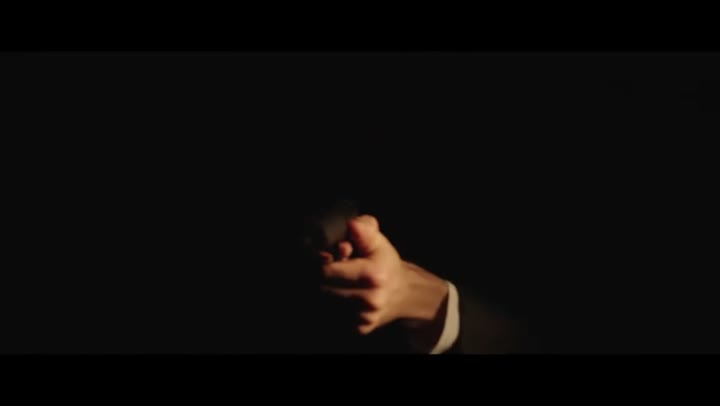
These frames come from the playable 007 casting clip. Watch how little movement the shot needs once the side light begins to pick out the actor.
The first detail emerges
The shot is dark enough to hide the set. A warm edge on the person’s hand is the first clear indication that a figure is in front of the camera.
The light finds the eye
The warm light reaches the cheek and one eye while the opposite side of the face recedes into shadow. The framing gives the audience time to recognize the actor.
Hold the recognizable face
The composition changes very little. The face and collar remain the two brightest cues, long enough to register before the shot falls darker.
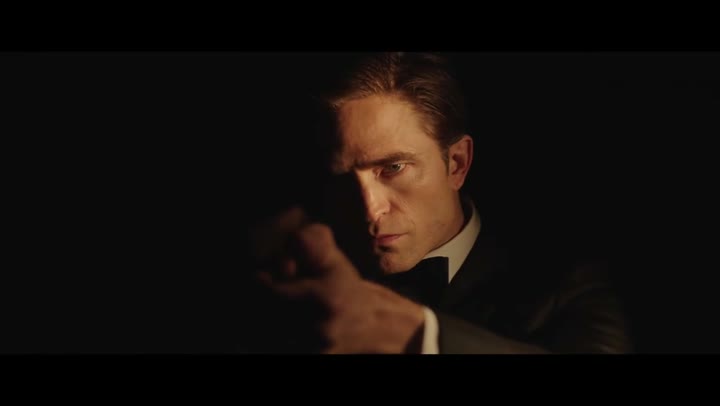
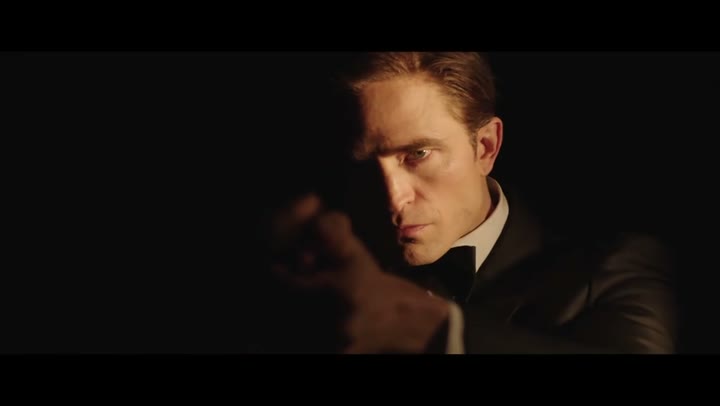
Choose a portrait for the face in the spotlight
Pick a recent photo where somebody who knows you would recognize you instantly. A chest-up portrait makes it easy to see how the chin, neck and shoulders connect. It also provides enough room for the model to add the collar and bow tie. A close headshot can work, provided the top of your hair and the bottom of your chin are still inside the image.
Even light in the source photo matters because the preset will remove most of it in the finished shot. A window or an evenly lit room gives the model useful information about both eyes, the cheekbones and the shape of the jaw. A dark party photo can look right for a spy story, yet it leaves very little information about how your face looks under another light.
If you want your glasses or beard to carry over, show them clearly. Clear lenses and a dark background are a good match when the face stays readable. Reflections across both lenses, a heavy beauty filter or a hand pressed to your cheek can make the lit part of the shot less recognizable.
The default James Bond Reveal prompt
@Image1 is the adult you cast. Look at the photo for the features that should carry into the light, including the hairline, glasses and beard. @Video1 is the attached widescreen teaser. It sets the framing, the pace and the path of the light. The template dresses your character in the black tuxedo, white shirt and bow tie even if your chosen portrait shows an everyday T-shirt.
The original cast announcement spends several seconds asking your eyes to adjust. The first small bright detail may be a sleeve or the edge of the white shirt. The face only becomes readable when the light reaches the cheek and eye. That order makes a recognizable reveal on a phone even when the backdrop and the jacket are almost the same shade.
Use @Video1 for the camera, the timing of the reveal and the contrast of warm side light against black. Cast the adult in @Image1 as the only person. Keep their face, age, skin tone, hair, facial hair and glasses consistent from the first glimpse to the final hold. Keep the original 16:9 chest-up framing. Dress the subject in a black tuxedo, white shirt and dark bow tie. Open almost black with only the shoulder line visible. Around 6 seconds, let the warm light catch the shirt and collar. Gradually show one cheek and eye, then hold the recognizable face in the light before it slips toward shadow. Keep the free hands relaxed and below the frame. One continuous shot with restrained movement. No weapon, studio graphics, outlet identifiers, announcement text or watermark.
Let the warm light reach the left cheek
Open Edit prompt and find the line that gradually brings one cheek and eye into view. Replace it with “Let the edge of the white collar appear first. Then draw the warm light across the left cheek and hold as it catches the left eye.” Keep the nearly black opening. If the cheek is visible from the first frame, the collar loses its part in the reveal.
Play the whole clip on a phone before scrubbing around the face close-up. The opening should feel like a deliberate pause. When the face appears, check the eyes, the jawline and the collar at normal size. A still from the brightest frame can look convincing even when the face shifts during the transition, so watch the few seconds on either side of it.
For a subtler change, keep the original direction of the light and ask for one small glance toward it. Leave the shoulders still and the hands below the frame. Play the transition in the full 16:9 view, where you can see the illuminated eye against the entire dark half of the picture.
Where the James Bond reveal came from
Amazon MGM Studios announced Robert Pattinson as the next Bond on November 16, 2026. The 007 account published the shadow-to-light teaser featured here. Later posts joked about who else Pattinson could be cast as, carrying the mock announcement format beyond the film.
Amazon MGM confirms the casting
The studio names Robert Pattinson as the next James Bond. The official news post gives the production context for the clip.
Amazon MGM announcementThe 007 account shares the reveal
The TikTok teaser holds the tuxedo-clad figure in shadow before the light makes his identity clear. This is the post used by the player.
Watch @jamesbond007Casting parodies spread
The joke moves from Bond to invented casting announcements for other roles, including posts about Snoopy and a fictional football signing.
See the documented parody posts
Frequently asked questions
Can I wear normal clothes in the portrait?
Yes. Use a clear portrait in your everyday clothes. The default scene supplies a tuxedo, shirt and bow tie.
Which photo keeps the final face most recognizable?
Choose a sharp, evenly lit photo with both eyes and the outline of the jaw visible. Include shoulders if you can, and give the hair and chin a little margin.
Can I change the color of the light?
Open Edit prompt and name the color and the direction you want. Keep a short hold with one eye in the light so the viewer can read the change.
What shape is the finished video?
Both quality settings use the original 16:9 landscape framing. You can see the space around the shoulders in the reference player before choosing a portrait.
Will it play the original audio?
Yes. The generated MP4 includes the soundtrack from the 15-second reference edit displayed here.
How many credits does it take?
Kling Standard (720p) costs 800 credits. Kling Pro (1080p) costs 1,700 credits. Both produce a 15-second clip.
Can I select a photo before signing in?
Yes. Choose or replace the photo and edit the prompt first. Generate video opens the sign-in dialog so you can confirm the quote after signing in.
Can I use a real person’s photo or share the result publicly?
Mianvo provides the video tool. You are responsible for the material you upload and how you use the result. You need permission to use someone else’s likeness or voice. Real-person face swaps and impersonation are prohibited, even with consent. Before sharing, make sure you have the rights to publish the visuals and music. Do not present an AI-generated clip as genuine footage. To report infringement, send the page link or task ID to support@mail.mianvo.com. We review reports and take action under applicable law.