365 Elevator AI Video Generator
Someone is already waiting as the steel doors open. The newcomer steps past the camera, turns and checks a phone. Give these two parts to people you know and let the silence between them do the work while Sampagne’s “365” plays.
Why choose Mianvo?
The role thumbnails come from the same shot as the player. Match each photo to the passenger you mean, then scrub past the entrance to see where both people will end up before spending credits.
- Credits back if generation fails
- See the credit cost before you generate. If the job is confirmed failed and no video was delivered, we return the credits reserved for it.
- Your photos stay private
- The selected model provider processes your photos. They stay private, and Mianvo does not use them to train its own AI models. You decide whether to publish your video.
- Automatic photo cleanup
- Original photos stored by Mianvo enter automatic cleanup 24 hours after upload. If a queued or running job still needs a photo, cleanup waits until that job ends.
The meeting, from the hallway
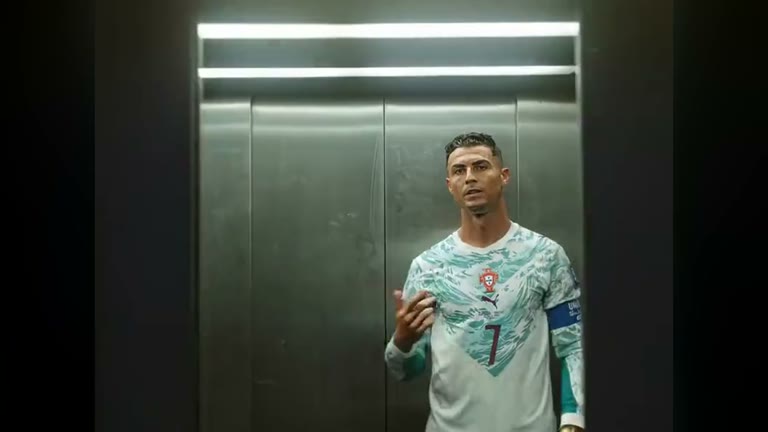
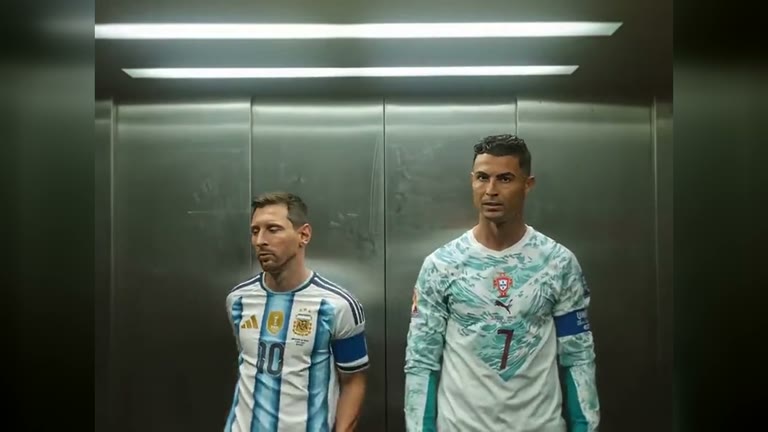
Look at the gap next to the first passenger. In the opening shot it is simply empty floor in a lift. By the end it has become the place where the second person stands. The same view of the back wall connects those two images.
Room for a second person
The pale shirt is already visible on the right. Notice how much empty space lies to the other side. Nothing points at it, yet the composition leaves a natural place for someone to enter.
The newcomer passes us
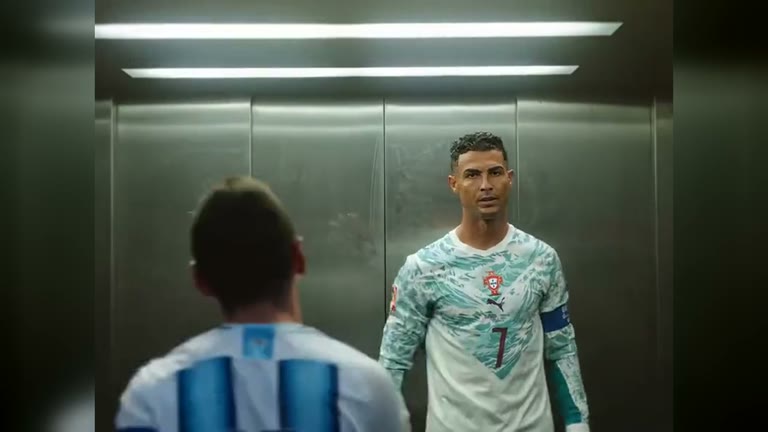
An arriving back fills the near side of the shot. For this beat viewers recognize a shirt before they recognize a person. The distant passenger remains a useful point of comparison as the foreground figure turns.
A moment with the phone
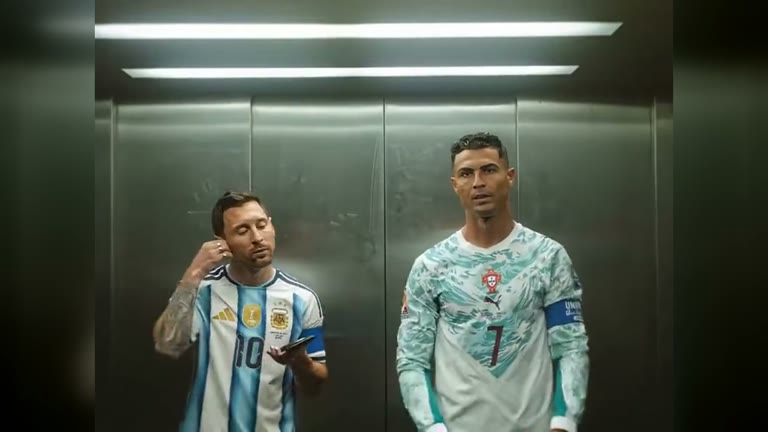
The newcomer now has a face. One hand holds the phone as the other lifts near the ear. That small distraction lets both passengers share the cabin before either has to acknowledge the situation.
Read the pair together
With the entrance complete, compare their expressions at the same time. The left passenger has finished turning and the right one is still where you first found them. The overhead strips keep the frame remarkably still around the pair.
Choose two faces for the elevator encounter
Think of the passenger already inside as the person delivering a reaction without saying anything. We see this face before the newcomer has turned around and again after the phone goes away. A portrait taken at eye level makes it easier to recognize the same expression at both ends. If you have a choice between a smiling party picture and a quieter one with the eyes turned toward the camera, the quieter one plays nicely against the awkward wait.
The arriving passenger has a different reveal. We see the back of a shirt before we get a proper look at the face, and the turn briefly takes the face through profile. Give that slot a photo in which the hairline, jaw and top of the shoulders are visible. A sleeve stripe or the edge of a contrasting collar can be enough to pick this person out before you see the face. It helps more here than trying to pose with a phone for the upload.
You can start with one photograph of the two of you together if you can make two separate, clear crops. Give each file a little room around the head and keep the other person’s hand or sleeve out of the crop. A different outfit on each person is handy in this scene because the lights, steel walls and camera stay the same when the newcomer turns. Neither picture needs an elevator behind it.
What the reference supplies
The attached video sets the point of view. Imagine you are waiting just outside the lift, looking straight at the back wall. The person in the cabin is already visible, then a shoulder comes in close to you and blocks part of that view for a moment. Describing a second camera inside the lift would lose the sense that someone has just walked past you. The preset keeps one camera in place through the whole meeting.
Read the role assignments in order before making an edit. The same arriving passenger owns both the back you see at the entrance and the face that eventually appears on the left. The waiting passenger stays visible on the right. Naming each person by what they do at the door gives the prompt a clear reference even while only one face can be seen.
Edit @Video1. Cast @Image1 as the waiting passenger on screen right and @Image2 as the passenger entering with their back to camera and settling on screen left. Keep each person’s features, hairstyle and identifiable clothing through the turn. Preserve the fixed view of the steel lift, the door opening, the brief phone gesture and the shared deadpan look. Follow the reference timing and music.
Give the glance a reason
For two friends with very different styles, you might add “When the arriving passenger pockets the phone, let the waiting passenger glance briefly at their bright jacket.” A jacket that is already visible in the second photo gives that look a natural destination. The short glance fits into the moment before both face forward. A conversation, a wave at the camera or an extra person waiting outside would need a different amount of time and a different shot.
Keep the sound on when you review your version, then replay it quietly and watch only the eyes. With music, the waiting beat can feel surprisingly short. Without it, it is easier to see whether the glance actually lands on the other passenger before the pair settle. If you have changed several gestures together, return to the preset and introduce one of them at a time.
The music and two elevator edits
The song post and the elevator posts below document different parts of the trend. The football clip is the visual reference used on this page.
Sampagne posts “365”
The artist account shared the track on TikTok before the elevator edits below. This post identifies the music for the scene. The elevator setting and the two passenger roles come from a later edit.
Sampagne’s TikTok postAn earlier pair meets in the lift
A November post from @neoausdermatrix33 uses the meeting-in-the-lift premise with another pairing. It provides a point of comparison for how the same small setting can bring very different duos together.
Earlier elevator postThe football duo
The same account paired AI versions of Cristiano Ronaldo and Lionel Messi in the cabin. The contrasting shirts, the brief phone gesture and the shared ending identify the football version referenced here.
Football duo on TikTok
Frequently asked questions
Who is waiting and who makes the entrance?
The first photo belongs to the passenger standing inside on the right. The second belongs to the one who passes the camera, turns and settles on the left. Choose on the basis of who you want to make the entrance. Where the two people stood in the photographs you uploaded has no bearing on the direction of the turn.
Is this a real meeting between the two footballers?
The reference is a public AI edit featuring likenesses of the players. Its two football shirts make the role change easy to follow, but the clip is a staged piece of fan media. For your own version use two people who have agreed to appear, and mark the result as an AI edit when the setting could otherwise look like a real encounter.
What fits in the landscape video?
The copy of the reference used here has an almost four-to-three central picture. The prepared widescreen file extends the sides with a soft background so that the original doorway, the newcomer’s shoulder and the waiting passenger all fit. At the end both faces are visible together. A vertical crop centred on either face can cut the second passenger out of the final stare.
Should my photos include the doors or the phone?
Both props belong to the video reference, so an ordinary portrait works. If your favourite picture is a mirror selfie, check whether the phone covers an eye or the middle of the face. Those details are particularly visible after the arriving passenger turns. Where possible, use a picture of that same person taken by someone standing across from them.
How long is the clip and where can I hear the track?
Play the reference with the speaker control turned on to hear the section of “365” used for this particular edit. The prepared reference is just over fourteen seconds and the generator uses a fourteen-second setting. The end is a held look rather than another scene. When comparing your result, let that look play out with the music before you decide where to trim.
Can I use a real person’s photo or share the result publicly?
Mianvo provides the video tool. You are responsible for the material you upload and how you use the result. You need permission to use someone else’s likeness or voice. Real-person face swaps and impersonation are prohibited, even with consent. Before sharing, make sure you have the rights to publish the visuals and music. Do not present an AI-generated clip as genuine footage. To report infringement, send the page link or task ID to support@mail.mianvo.com. We review reports and take action under applicable law.