Addicted Dance AI
A hand fills the lens. When it clears, a dancer in a pale veil has taken the floor. Cast yourself in the opening solo, then bring a friend into the duet under the string lights.
- One required portrait
- Optional duet partner
- 15-second reference edit
A real example from Mianvo
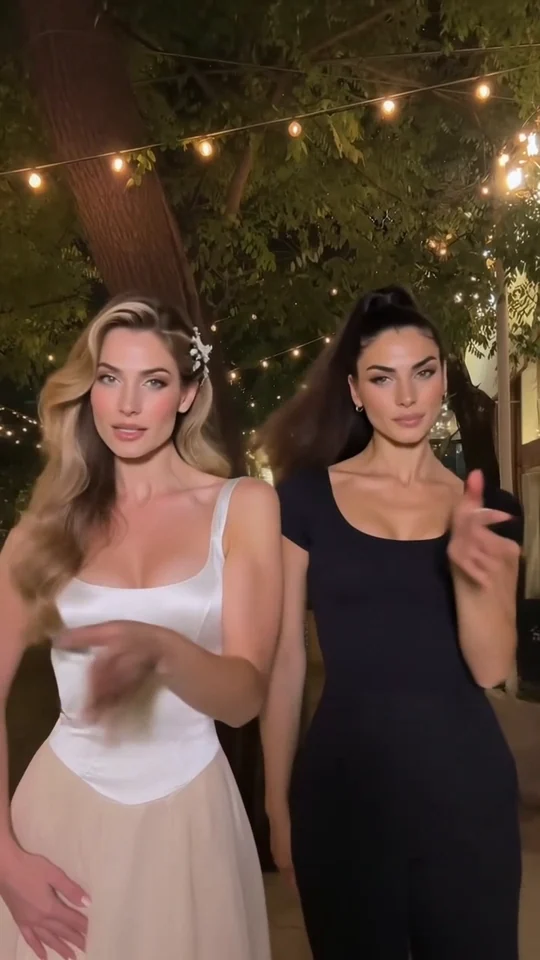
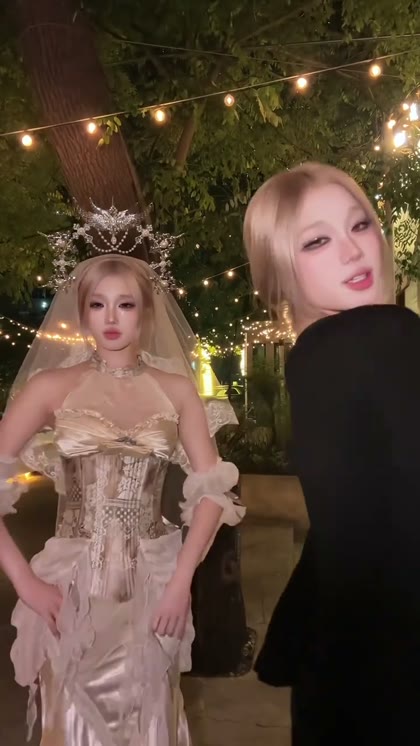
We cast both dancers from AI-generated full-body photos and ran the duet in Kling 3.0 Omni Standard. At 11 seconds the blonde dancer in ivory is on the left, and the brunette who opened the dance is back on the right.
How we made this video
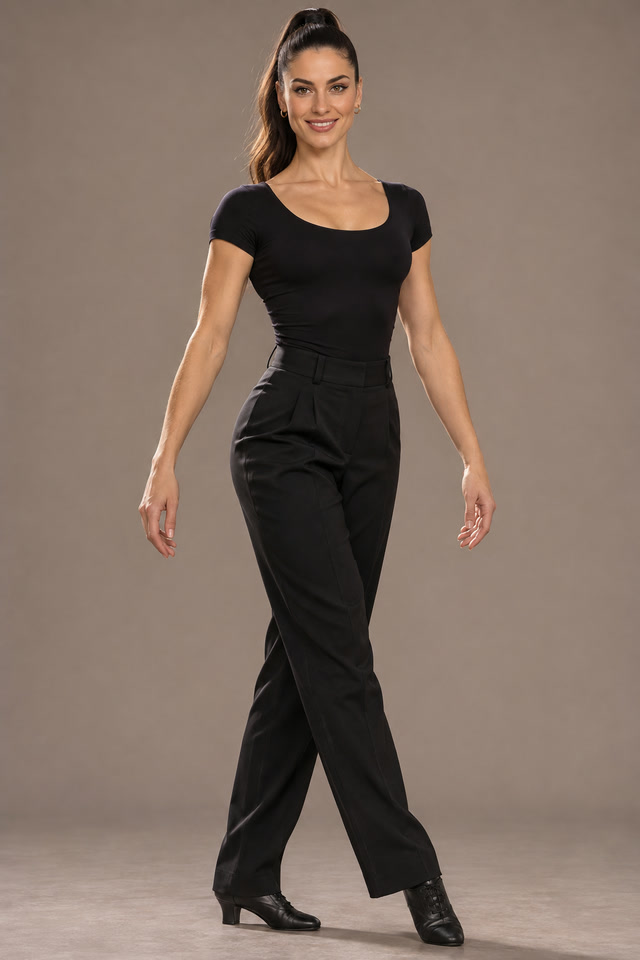
The high ponytail is easy to follow when her hand passes the camera and she returns for the duet.
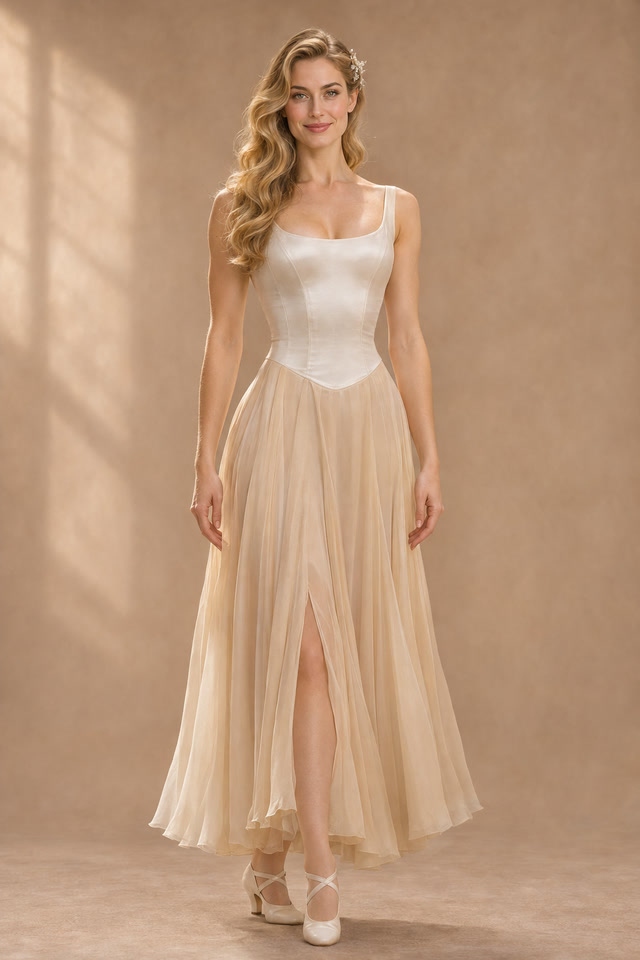
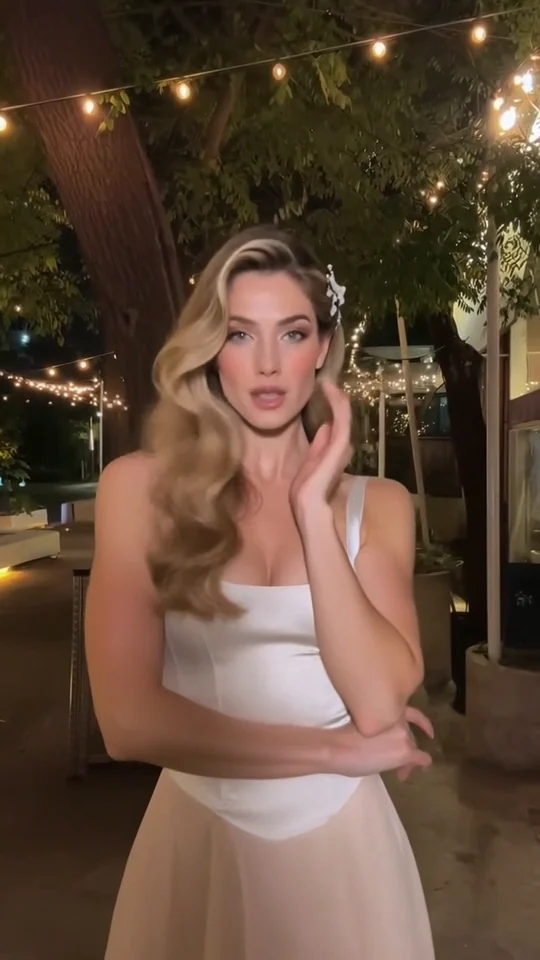
Her loose waves and pale dress carry into the solo. The veil and crown from the reference drop out in this take.
How does the audio match?The edit kept the reference music. We compared the two audio tracks near the start and again during the duet; both excerpts lined up on the same beat.
The prompt we used
Why choose Mianvo?
Drag the divider at 11 seconds to see where each dancer lands in the duet. You can open the two photos used in our test before picking your own cast.
- Credits back if generation fails
- See the credit cost before you generate. If the job is confirmed failed and no video was delivered, we return the credits reserved for it.
- Your photos stay private
- The selected model provider processes your photos. They stay private, and Mianvo does not use them to train its own AI models. You decide whether to publish your video.
- Automatic photo cleanup
- Original photos stored by Mianvo enter automatic cleanup 24 hours after upload. If a queued or running job still needs a photo, cleanup waits until that job ends.
The original and output at the same moment
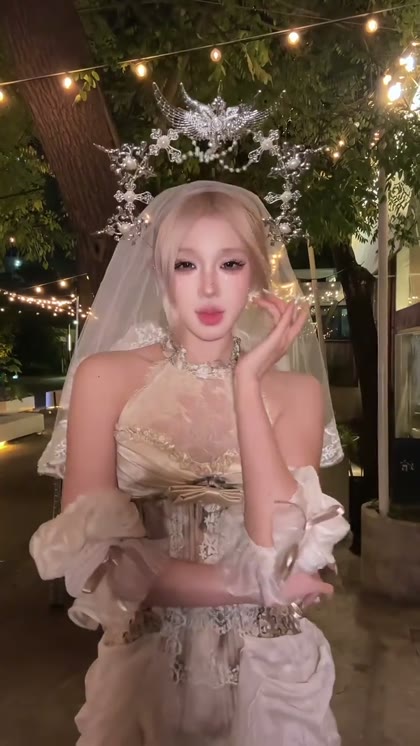
7.15 sThe second dancer brings a hand to her cheek
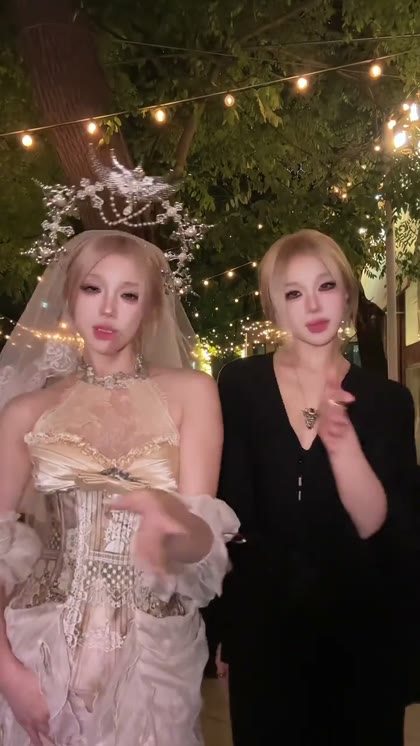
11.00 sBoth dancers under the string lights
Three entrances in fifteen seconds
Follow the performer rather than the background. The tree and its lights stay recognizable as the framing changes from a solo to another solo and then to a pair. Each time below starts at the beginning of the excerpt in the player.
A hand rises past the camera
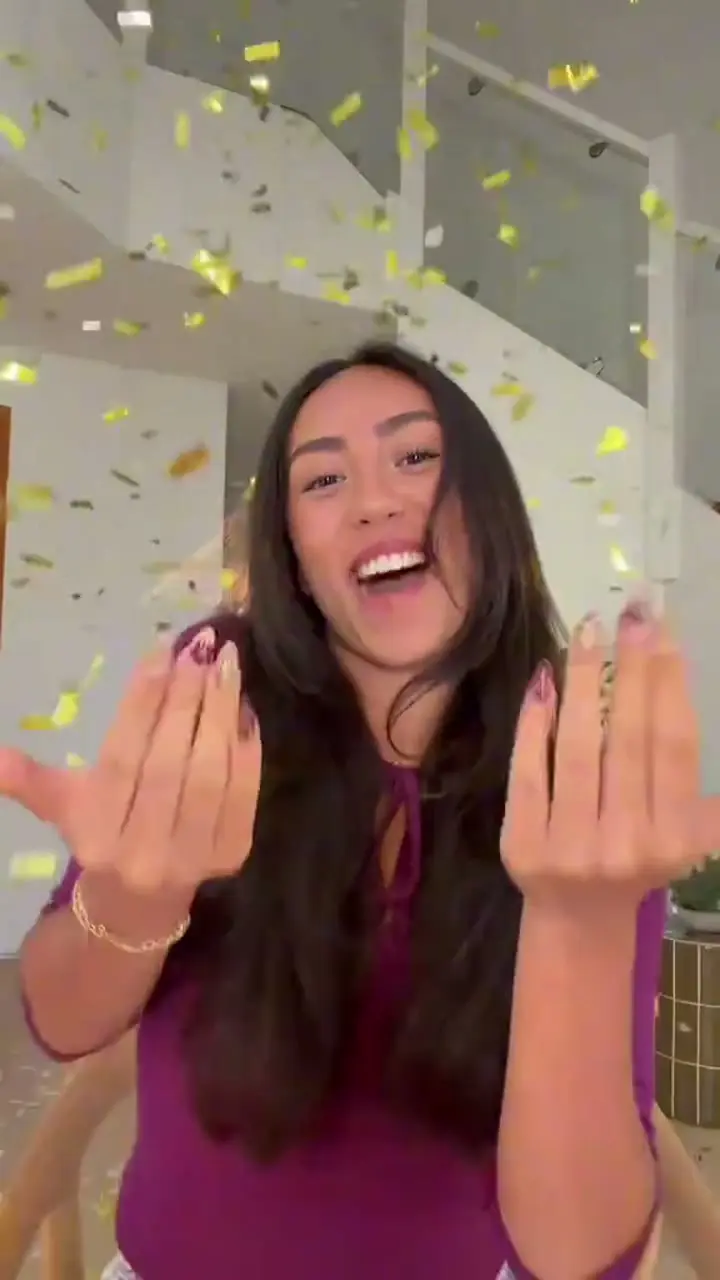
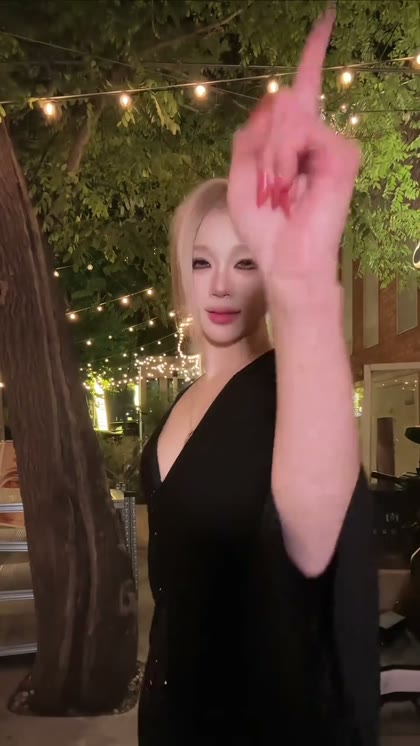
The opening dancer squares her shoulders, turns slightly and raises one hand through the space above her face. Her fingertips grow large as they come close to the lens. A few beats later an open hand crosses the foreground, providing cover for the cut to the next dancer.
The veil comes into focus
The second solo occupies much the same patch of ground. The pale sleeves and pointed headpiece make the switch readable immediately. Watch how one forearm folds across the waist while the other hand travels by the cheek. The new face has a moment on its own before the partner comes back.
Left and right become two distinct roles
The veiled dancer holds the left side of the image and the dancer in black takes the right. They turn toward each other and gesture across the small gap between them. Their hands move into each other’s space; their positions stay easy to follow if you look at the shoulders below the hands.
The opening dancer returns to the foreground
At the end of the exchange the dancer in black turns and steps in toward the camera from the right. That last change of scale gives the first portrait one more close look. The veiled performer stays farther back, so the ending reads differently for the two people you cast.
Which portrait fits each dancer?
Start with the person you want the audience to recognize before the edit. For the first few seconds the dancer in black has the frame to herself. She looks straight ahead as her hands turn outward, lifts an arm, then reaches past the camera. Pick a picture in which the eyes and brows are easy to see and at least one cheek is fully visible. Save the picture of you holding the phone right in front of your face for another occasion. Here the moving hand is already built into the video.
For the second dancer, think about the few beats immediately after the hand crosses the lens. A pointed headpiece and a pale veil surround her face as she moves a hand from one side of it to the other. A face lit evenly from the front works well here. You can use an ordinary portrait in a T-shirt. The reference shows a veil and crown. Our full-body test photo had loose hair and a pale dress, and those are what appeared in the finished solo. A large hat or a dark fringe across both eyes makes it harder to tell which parts of the outline belong to your photo and which belong to the stage costume.
Friends often have one good picture together. Make a separate crop for each slot, keeping the whole head, the hairline and a little of the neck in each. Inspect the edge nearest your friend before saving it. If a second eye, hand or piece of someone else’s hair is still visible next to the face, take a different crop or use another photo. Put the opening dancer in the first slot even though that person stands on the right when the camera finally shows the pair.
You can leave the veiled slot empty. The instructions then keep the second performer from the reference, including her entrance and part in the duet. That choice is handy if the moment you want is your own arm coming up and your face returning at the very end. To make the exchange between two friends the center of the video, fill both slots and check the names beside their thumbnails before you generate.
The Addicted Dance prompt for this night-time duet
The prompt identifies the two roles by the order in which they appear and by their costumes. At the beginning there is no left-hand partner to point to. Once the pair meet, the veiled dancer is on the viewer’s left and the opening performer is on the right. Those two ways of naming a person describe the same cast from different points in the edit. They help keep the opening portrait attached to the returning dancer when both faces are visible.
The video supplies the hand that comes toward the camera, the change of performer, the tree and the row of bulbs above their heads. The portraits supply the faces you want to see. The default instruction keeps this division of work through the final close approach. Read it alongside the player: the moment the first hand goes soft and fills the foreground is the easiest place to see why the cut needs to stay where it is.
Edit @Video1. Cast @Image1 as the opening dancer in black. Use @Image2 for the veiled dancer only if a second portrait is attached; otherwise keep that dancer from the video. Keep each cast face and hairstyle recognizable through the solos and the shared frame.

Keep the night setting, overhead string lights, dark outfit for the first dancer and pale costume, veil and headpiece for the second. Match the original timing: follow the first dancer’s raised arm and hand reaching into the lens, the cut to the veiled dancer and the hand beside the cheek. In the duet keep the veiled dancer on screen left and the first dancer on screen right. End with the dancer in black coming close to the lens. Preserve the framing, cuts and reference sound.
Give the pair a matching detail in the final shot
Try adding this sentence: “When the dancers stand together, give each a small silver brooch on the shoulder that faces the other dancer.” That places the addition where the viewer can see both costumes at once. Keep the black outfit, pale veil and hand transition in the rest of the prompt. The two costumes make it easy to tell who has returned, even while their arms overlap and their faces turn away from the camera.
When your result is ready, start at the change of dancer and watch through the last shot instead of judging the opening frame alone. Look for the first portrait returning on the right, the second staying on the left and the hand gestures passing between them. If you try another version, change one detail, such as the brooch or the expression in the closing look. Keeping the same portraits gives you a clear basis for comparing the two takes.
Where this version of the Addicted Dance comes from
Two dated TikTok posts connect the artist’s challenge to the version in the player. The night shoot is the reference for this template.
JISOO posts to her own track
JISOO shared a short TikTok using “ADDICTED,” tagging the post with her name and the track. Her post gives the challenge a primary source for the music. Open it alongside the later duet and you can see how a short performance to the same track became a different staging.
JISOO’s TikTok postThe duet moves under the string lights
The account @ay76417 posted the night-time version used here, tagging JISOO and performing to the same sound. The contrast between the black outfit and the pale veil, followed by the two dancers sharing the shot, gives this version its casting order. The linked post includes the opening seconds that precede our fifteen-second excerpt.
@ay76417’s reference post
Frequently asked questions
Can I put just myself in the Addicted Dance?
Yes. Pick a picture for the opening dancer and leave the veiled dancer’s slot empty. Your role begins alone, disappears when the hand passes the lens and returns on the right of the duet. The other performer still has a solo. If the person you want beside you is a friend, add their portrait to that second slot before you generate.
Which part of the original TikTok is in the template?
The linked post runs for about nineteen seconds. This template uses a fifteen-second excerpt, starting three seconds into the upload. The cropped length keeps the reach toward the lens, the veiled solo, the two dancers exchanging gestures and the closing look in the same edit. Times in the storyboard are measured from the beginning of the preview here. Follow the creator link below the player to see the earlier opening of the full post.
Does the exported dance keep the music?
This preset uses the audio from the reference excerpt. The preview lets you hear which part accompanies the reaching hand and the duet before choosing a photo. If it starts quietly on your device, unmute the player. When posting to a social platform, check what soundtrack rights and music options apply to the account where you plan to share it.
Do I need a costume, a veil or a dance video?
A still portrait is enough. The raised arms, the turn of the veiled dancer’s head and the final step toward the camera come from the performance. You do not need to copy those poses in a selfie or find an outdoor venue. If you are choosing between a group performance photo with a tiny face and a plain close portrait with clear features, use the portrait for this edit.
What changes when I switch between 720p and 1080p?
Both options use the same fifteen-second vertical reference and preserve the order of the two entrances. Choose a resolution to see its credit quote above the generation control. The source footage shown here is 720 × 1280. Choosing a larger output changes the dimensions of your generated video; the preview remains the same recording, so you can compare the poses against the same frames at either setting.
Can I use a real person’s photo or share the result publicly?
Mianvo provides the video tool. You are responsible for the material you upload and how you use the result. You need permission to use someone else’s likeness or voice. Real-person face swaps and impersonation are prohibited, even with consent. Before sharing, make sure you have the rights to publish the visuals and music. Do not present an AI-generated clip as genuine footage. To report infringement, send the page link or task ID to support@mail.mianvo.com. We review reports and take action under applicable law.