AI Huss Huss Huss
You are in the middle of telling the camera why you stay in while everybody goes out. The dumbbells come up, you turn to the side, and the “huss, huss, huss” gives you away.
Why choose Mianvo?
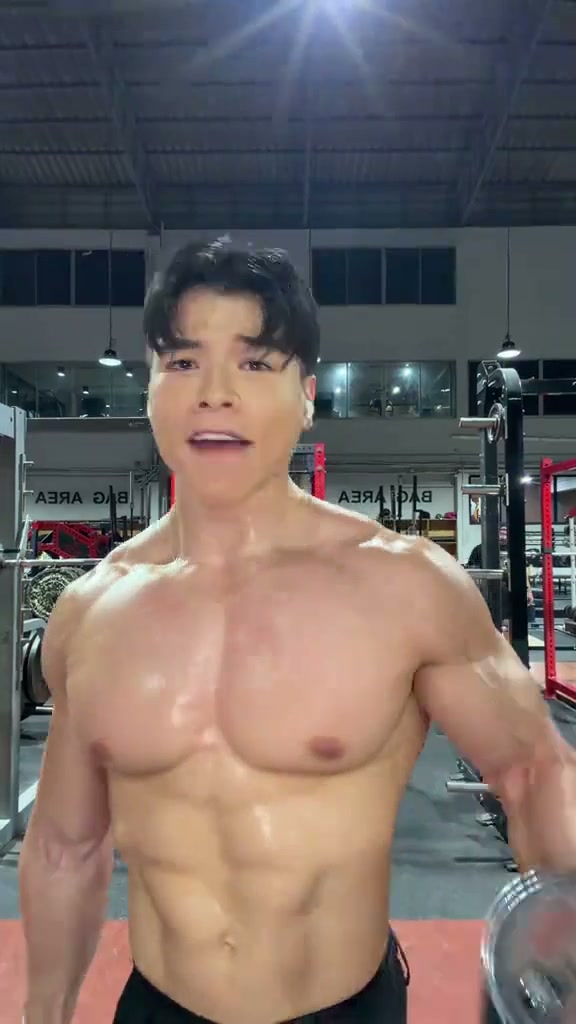
You can scrub straight from the opening close-up to the dumbbell turn and see which pose your portrait has to carry. The role thumbnail shows the same gym performer you will replace in both views.
- Credits back if generation fails
- See the credit cost before you generate. If the job is confirmed failed and no video was delivered, we return the credits reserved for it.
- Your photos stay private
- The selected model provider processes your photos. They stay private, and Mianvo does not use them to train its own AI models. You decide whether to publish your video.
- Automatic photo cleanup
- Original photos stored by Mianvo enter automatic cleanup 24 hours after upload. If a queued or running job still needs a photo, cleanup waits until that job ends.
Five moments in the Huss gym lip-sync
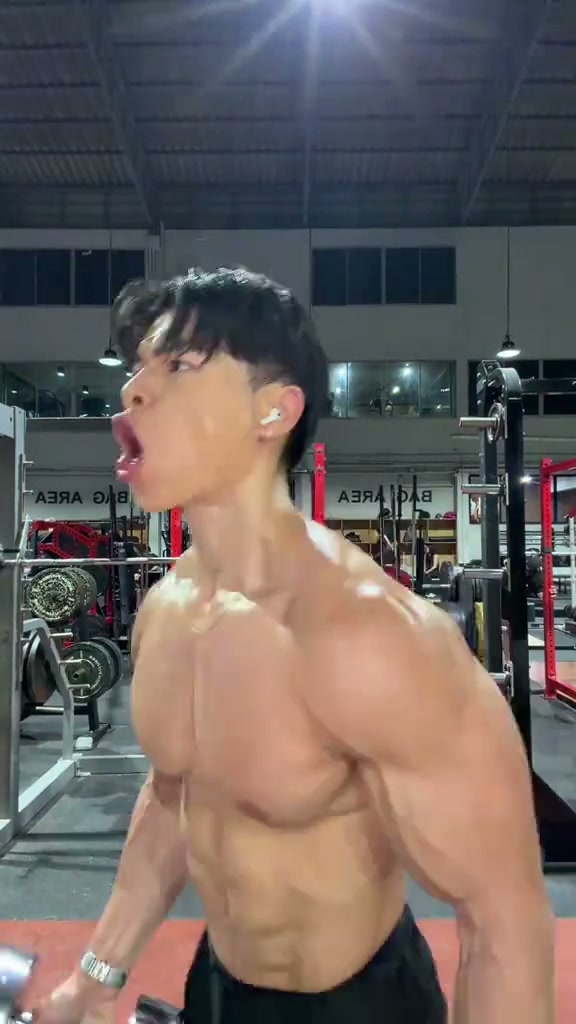
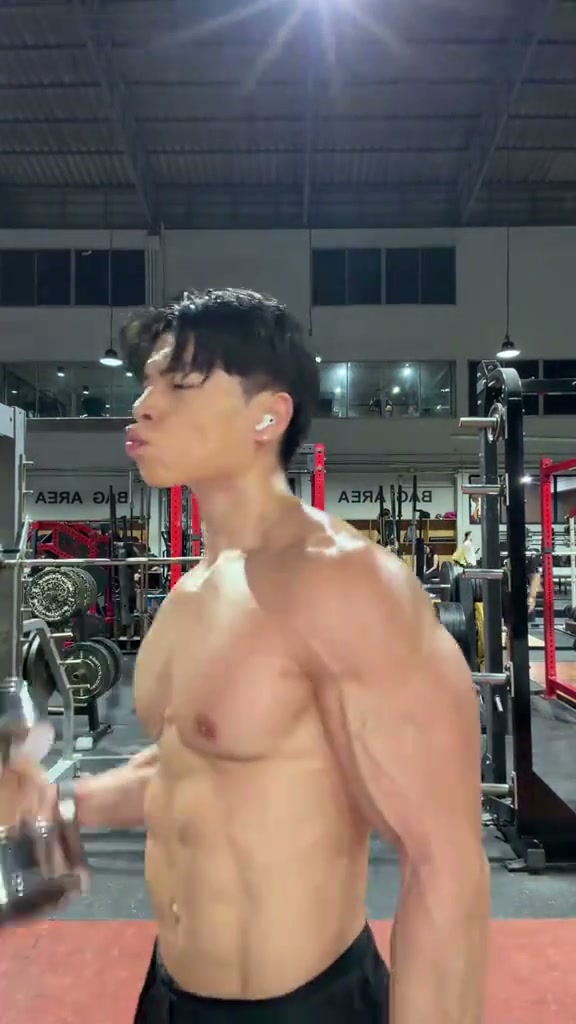
The visible landmarks are small: a shoulder turns, a weight enters the frame, a face briefly slips away. Watch the performer against the red racks in the background to follow the movement through the vertical clip.
The speaker starts close to the lens
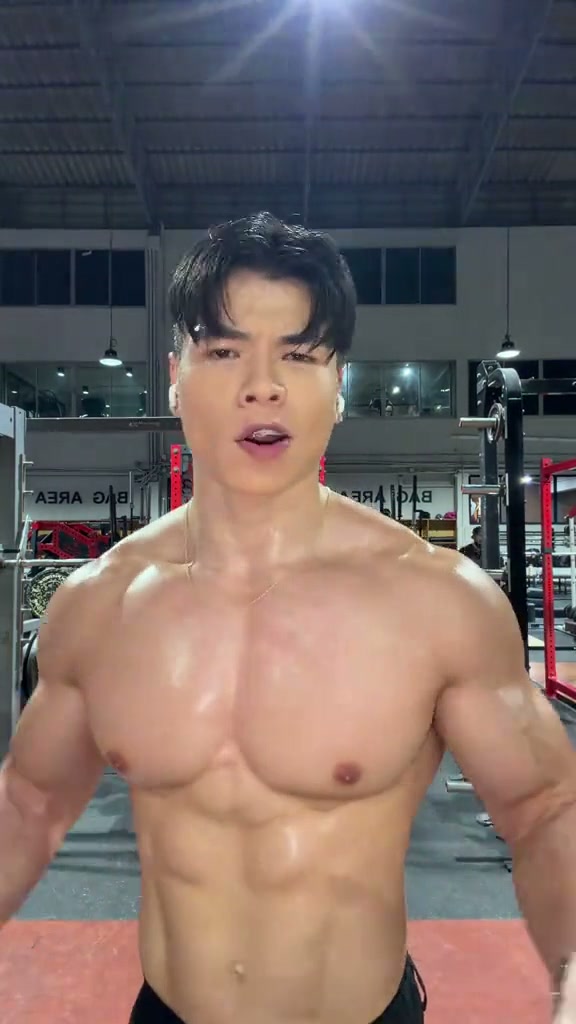
Right from the opening, the person is addressing the viewer. The ceiling lights and racks establish a busy gym, but the performer takes up most of the useful picture area. Notice where the mouth and eyes sit in the frame. That is where details from the portrait are easiest to compare later in the clip.
The metal weights enter the conversation
As the spoken phrase gives way to the huffing, the metal ends of the weights come up into view. They catch the overhead lights. Watch the shoulder turn along with the weights. It changes the whole outline of the person without moving us to a different room or introducing a second character.
The presenter moves toward the edge
The speaker turns almost sideways and briefly dips toward the edge of the picture. For a moment you can see more of the equipment behind them. A realistic change from a front view to a profile is a more useful cue here than holding the exact head position from the uploaded portrait through every frame.
Back to the lens for the next line
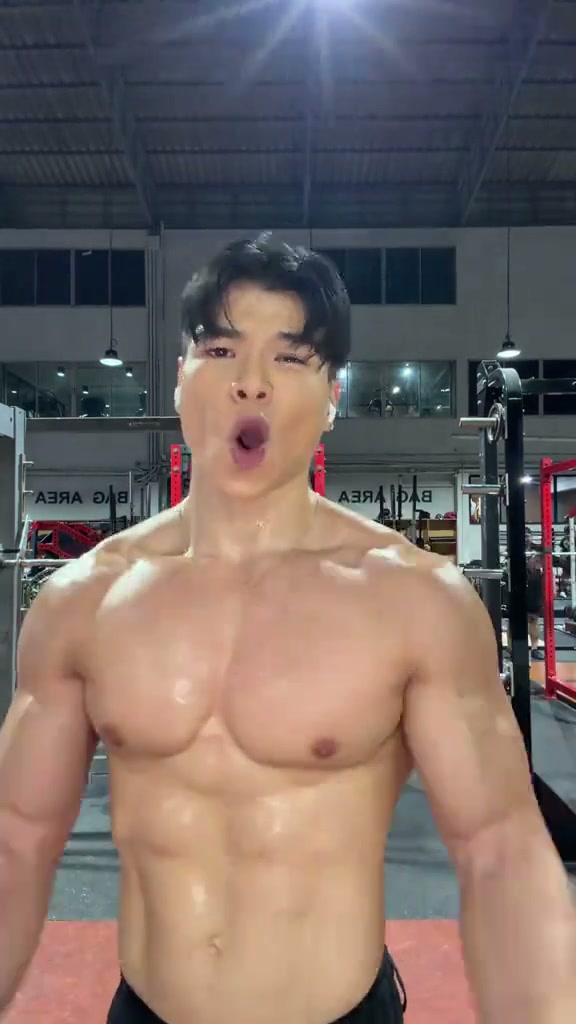
When the performer returns to the front, the joke goes back to words and gestures. There is time to see both eyes clearly again. Try jumping between this picture and the opening one to compare expression and hair. The speaker should feel like the same person even though the middle beat was almost in profile.
The last few lines stay with the speaker
The last stretch gives the face a little more room to change expression. Hands move as the speaker talks and the gym stays in the background. The template keeps this final part of the delivery so the reference feels like a piece of someone’s monologue, with the dumbbell moment breaking up the middle.
Choose a portrait for the gym close-up
Look at the opening of the reference before choosing a picture. The performer is already near the camera, with hair clear of the eyes and a brightly lit face. You need a photo that reads well at that distance. A chest-up portrait taken straight on, or turning just a little, gives you a clear view of both eyes and the shape of the jaw. A full gym selfie reflected in a mirror often makes the face much too small, especially when a phone covers one cheek.
If you have two candidate photos, imagine them at the point where the performer turns toward the side of the frame. Can you still see where the cheek meets the jaw? Is there enough of the hair at the temple to recognize the person in profile? These details link the side view to the close-up when the speaker swings round again. You can take the photo at home in ordinary light. The equipment, mirror and metal weights are all in the reference.
Space above the shoulders helps if you care about what the new performer wears. A clear collar or a recognizable shirt in the picture is a much better starting point than a tiny strip of fabric just under the chin. You can request that garment in the prompt. Keep your hands out of the way of the face in the photo; the reference gives the presenter plenty to do with both hands once the clip starts.
For a picture of two friends in a gym, crop out the other person and any reflection that looks like a second face. There is one part in this version. The people and equipment behind the speaker remain in the scene. A portrait of the person sitting still works perfectly well as an input even though the clip is about training. There is no need to hold a weight for your picture.
Read the Huss Huss Huss gym prompt
The opening is a conversation with the phone camera. The few seconds spent lifting are a comic interruption, after which the speaker goes straight back to addressing whoever is watching. The preset gives those three pieces to the editor in order. It also names the surroundings that will still be on screen when the performer moves away from the middle. Those details help the location read as a single gym through a surprisingly large change in pose.
There is already a voice in the reference. The editor follows its phrasing and the little repeated breaths that give the meme its name. There is no script field to record and no need to spell out every word of the monologue in the prompt. If you make a change, start by deciding at which point in the performance you should see it. A detail that only appears once is much easier to check when you know which shot to pause.
Edit @Video1. Use @Image1 for the single foreground gym performer throughout. Preserve the vertical camera position, the red equipment racks, mirror, overhead lights and the dumbbells. Match the opening direct-to-camera delivery, the turn to the side for the curls, the brief dip toward the edge, and the return to the lens with expressive hand gestures. Keep the original narration, breathy beats and timing.
Try a shirt change that survives the turn
For a clothed take, choose a portrait with a clear T-shirt and add this sentence: “Keep the performer in the dark green crew-neck shirt from the portrait, including during the side-on curl.” The cue names the moment at which you need to see the change. It also gives the editor something concrete to follow when the arm lifts in front of the chest. Leave the turn and return in the preset so the joke still lands on the same breath.
After generation, play the first few seconds with the sound on. Then move the scrubber back and check the cuff or neckline in the opening position, during the curl and when the performer returns to the middle. If a change matters more to you than the shirt, substitute that detail in the sentence. Asking for several new props, a different room and a new gesture at the same time makes it harder to see which instruction produced the result you wanted.
How the In This Town sound reached the gym
These posts distinguish the animated basketball story from the gym lip-sync used in the player. Each entry links to the corresponding creator’s own post.
A late-night basketball story
@larpniverse posted an animated character practising while other people go out. The repeated little bursts of breath give the scene its memorable sound.
@larpniverse on TikTokThe words become the hook
The same account followed the story with a post built around people saying “huss, huss, huss.” The repetition had become recognizable even away from the opening basketball scene.
@larpniverse follow-upThe dumbbell lip-sync in this player
@wiilliamli uses a real gym for the performance, interrupting the direct-to-camera lines to lift the weights. This is the specific post used for the reference here.
@wiilliamli on TikTok
Frequently asked questions
Is this the basketball or gym version of Huss Huss Huss?
The reference here is the gym lip-sync posted by @wiilliamli. A performer in front of weight racks speaks to the camera and turns to curl a pair of dumbbells. The basketball story belongs to an earlier animation linked in the trend history. When you generate here, the part you take is the gym performer.
Do I need a full-body picture or access to a gym?
A clear chest-up portrait is enough. The camera in the reference is close to the performer for much of the clip, and the original supplies the turn, the weights and the room. If you want to use a full-body photo, check the face at the size of a profile picture first. Heavy compression can make a distant face difficult to recover.
Can the gym performer wear my shirt?
Choose a photo showing the neckline, shoulders and enough of the fabric to identify it, then name the shirt in the prompt. The side turn briefly brings the arm across the chest. Pause there to check how the garment looks from a different angle. The source performer and your chosen photo can have different clothes.
Where does the “huss” sound come from?
The sound is already present in the gym performer’s lip-sync. The template uses the reference audio so the curl can land on the repeated breaths. You supply the picture for the person doing the talking. A new voice recording would have to fit those existing movements and is outside this template’s inputs.
How much of the original post is used?
The full source runs just over fifteen and a half seconds. This reference uses the opening fifteen seconds, including the turn toward the weights and the return to the camera. The original post linked underneath the player includes the remaining fraction of a second. Both available output qualities use the same vertical cut.
What should I watch for in the result?
Look for continuity when the speaker comes back into full view. The side angle gives you a quick look at the jaw and hairline, then the lens catches both eyes again. With sound on, follow the change from the breathy lifting beat to ordinary speech. Those few seconds show much more about this particular meme than a still picture of the opening pose.
Can I use a real person’s photo or share the result publicly?
Mianvo provides the video tool. You are responsible for the material you upload and how you use the result. You need permission to use someone else’s likeness or voice. Real-person face swaps and impersonation are prohibited, even with consent. Before sharing, make sure you have the rights to publish the visuals and music. Do not present an AI-generated clip as genuine footage. To report infringement, send the page link or task ID to support@mail.mianvo.com. We review reports and take action under applicable law.