AI King Jin Video Generator
Your portrait leads a four-shot street-to-rooftop edit.
- 1 portrait
- About 8 seconds
- 3:2 video
- Four scene cuts
The four scenes in this King Jin AI edit
AI King Jin puts the person in one portrait at the center of four shots. The crowd bows during a night street entrance, the camera cuts to a close-up, then follows the same lead through a teal-lit stairwell and onto a rooftop.
View TikTok source @xdwshfzqi0k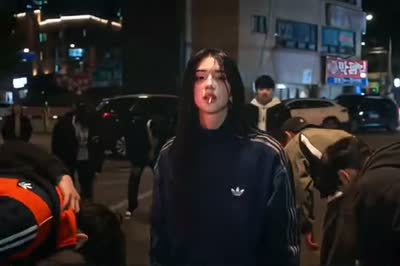
Street entrance 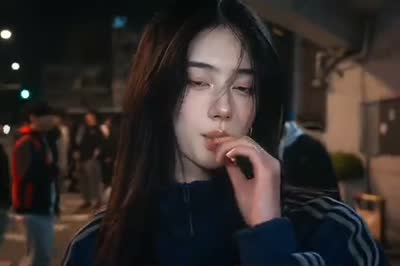
Face close-up 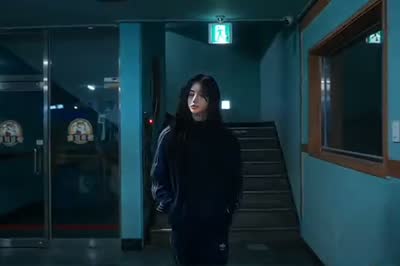
Teal stairwell 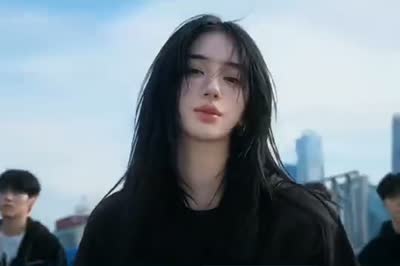
Rooftop
Which portrait holds up in the lollipop close-up?
Choose one front-facing or slightly turned portrait of your lead. Keep the eyes, lips, hairline and jaw clear. The lollipop shot brings the camera close enough that a deep shadow across an eye or a cropped chin can matter. The street lighting and the dark outfit come from the clip, so the portrait can be taken in daylight.
The prompt for King Jin’s four shots
The prompt assigns @Image1 to the lead across @Video1. The street crowd bows, the camera cuts to the face with the lollipop, then the lead enters the teal stairwell and joins the rooftop group. The prepared landscape clip contains one sequence. Its cuts and soundtrack connect the shots while the surrounding cast keep their own roles.
Replace the lead woman in @Video1 with the person in @Image1 across every shot. Preserve the uploaded person's recognizable face, skin tone, hair and natural head proportions, regardless of gender. Follow the reference's four beats in order: the night street entrance with the surrounding group bowing; the face and lollipop close-up; the teal-lit stairwell entrance; the rooftop group shot. Keep the same cuts, camera positions, action timing, backgrounds, lighting and soundtrack. The same uploaded identity must remain the lead in both wide shots and close-ups. Keep background performers unchanged; do not turn them into copies of the lead. Retain the dark outfit and the reference's expression and posture where possible. One continuous lead identity, natural anatomy, no duplicate faces, no additional text, no logos or watermarks.
How can I change the lead’s look in one shot?
In Edit prompt, try adding “In the lollipop close-up, the lead glances briefly toward the camera.” Keep that instruction tied to the close-up so the street, stairs and rooftop still follow the reference. Compare the eyes in the close-up with the lead on the rooftop, where other faces are in frame.
Create your video in three steps
- 01
Upload your photos
Upload one portrait with a clearly visible face. This identity replaces the lead across all four scenes.
- 02
Review credits
Check the four shots in the reference. Once your photo is ready, the generation button shows the credit cost.
- 03
Generate & download
Generate and compare the street shot, close-up, stairwell and rooftop before downloading.
AI King Jin FAQ
What is the AI King Jin effect?
It is a short entrance montage: a street group bows around the lead, followed by a face close-up, a teal stairwell and a rooftop scene. The template keeps these beats while replacing the lead.
Will the background people also change?
The prompt targets the lead only and asks to retain the surrounding performers. Background faces and motion can still vary during generation.
Does the lead have to look like a particular celebrity?
No particular celebrity identity is required. Upload a photo you have permission to use; the template applies that person’s identity to the lead role.
Why does the reference show one sequence when some posts stack two?
Some trend posts stack two versions for comparison. This template uses only one sequence so there is one lead to replace. The prepared reference is 3:2 landscape.
Does one photo cover every scene?
Yes. The same photo is used in every shot. The close-up is the best place to check likeness; the rooftop and street shots show whether the identity stays consistent.
How many credits does the four-shot edit use?
This eight-second edit costs 430 credits with Kling Standard at 720p or 910 credits with Kling Pro at 1080p. Preview the original four shots before choosing.
Can I use a real person’s photo or share the result publicly?
Mianvo provides the video tool. You are responsible for the material you upload and how you use the result. You need permission to use someone else’s likeness or voice. Real-person face swaps and impersonation are prohibited, even with consent. Before sharing, make sure you have the rights to publish the visuals and music. Do not present an AI-generated clip as genuine footage. To report infringement, send the page link or task ID to support@mail.mianvo.com. We review reports and take action under applicable law.