Anone Daisuki Dance AI Video Generator
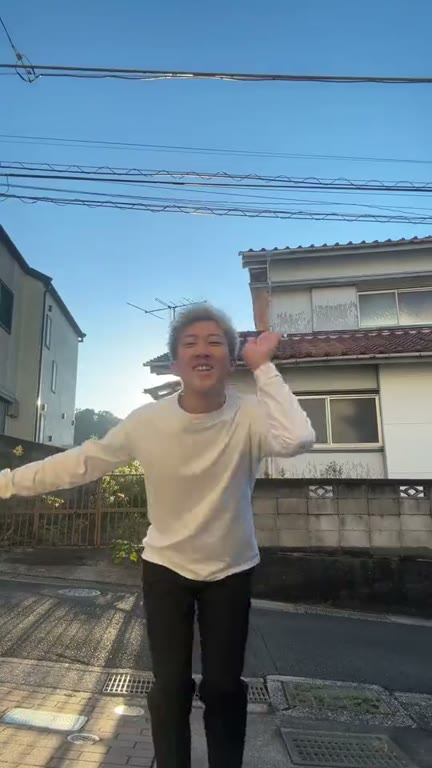
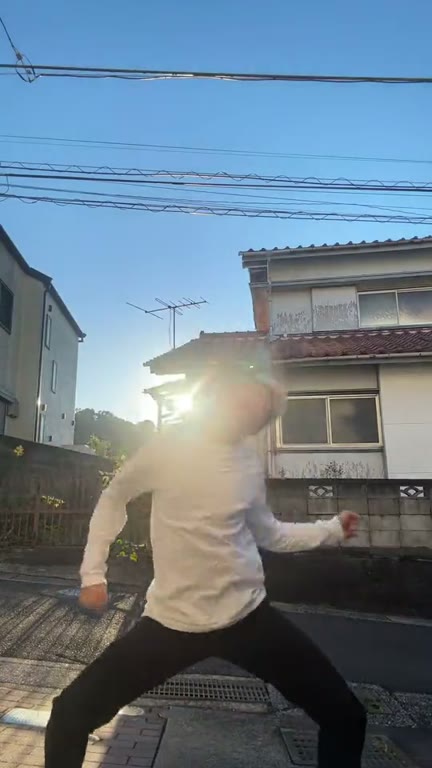
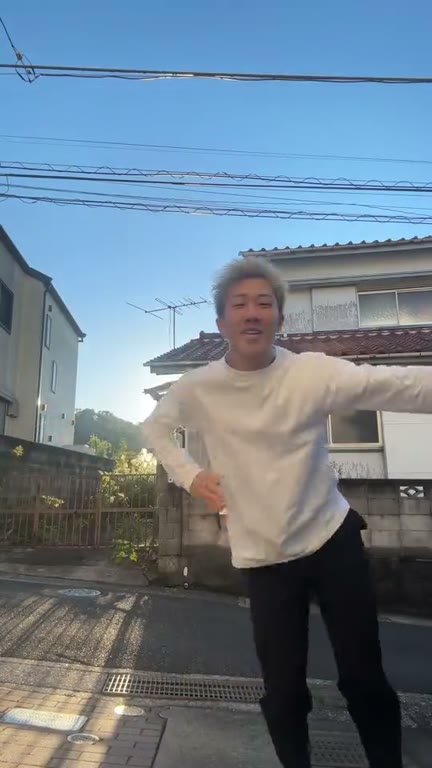
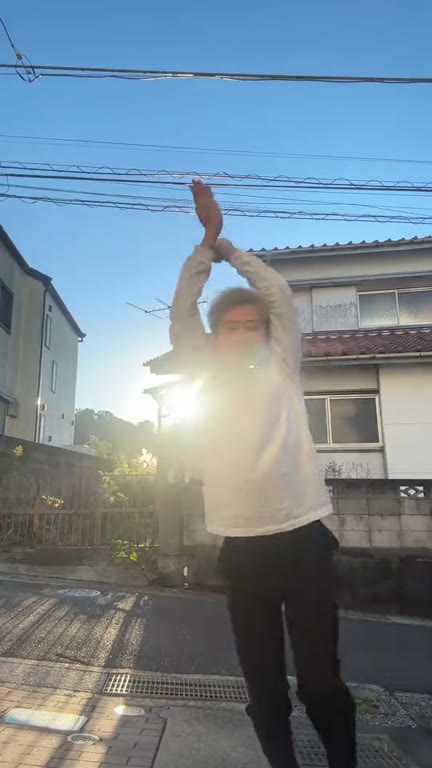
The sun peeks around the dancer’s shoulder just as the knees bend. A few beats later both arms lift against a clear blue sky. This version of the Anone Daisuki Dance puts one person into Takutin’s street routine to the music of Yuu Ichijo.
Why choose Mianvo?
Use the source frames to see where the fingertips sit against the sky and the torso crosses the sun. The reference player carries the same street take and music used by this template.
- Credits back if generation fails
- See the credit cost before you generate. If the job is confirmed failed and no video was delivered, we return the credits reserved for it.
- Your photos stay private
- The selected model provider processes your photos. They stay private, and Mianvo does not use them to train its own AI models. You decide whether to publish your video.
- Automatic photo cleanup
- Original photos stored by Mianvo enter automatic cleanup 24 hours after upload. If a queued or running job still needs a photo, cleanup waits until that job ends.
Follow the hands from cheek height to the sky
For the first half, pay attention to the space on either side of the waist. Later the movement uses the open space above the head. The wires and the house are useful fixed marks for seeing how much the person moves in this one view.
One hand marks the opening
Watch the change of scale between a hand close to the cheek and an arm extended out to the side. The gesture is personal and small, but there is already room around the torso for the much wider movement that follows.
The dancer settles into the low sway
The stance widens while the elbows stay relatively low. The backlight slips in and out of view as the weight moves from side to side. The street stays perfectly recognizable through this change in height.
The reach crosses the frame
After coming up from the squat, the arms travel much farther out. Use the house behind the shoulders to see how wide the shape becomes. A close camera crop would take away the end of that reach.
Two hands meet above the roofline
The silhouette changes again as both arms come together overhead. The fingertips rise into the open sky, clear of the face, while the sun flares near the chest. Follow the hands back down to see how the move resolves into the open finish.
Choose a photo for a dance that changes height
A large part of this routine happens between the shoulders and the waist. The dancer drops low, swings the upper body across the frame and then reaches upward with both arms. Use a photo taken far enough back that you can see how the sleeves meet the shoulders and where the top ends at the hips. The person can stand normally. The reference clip already supplies the bend in the knees and the timing of the overhead move.
Look at the face at the size it will occupy in a phone video. The sun shines into the lens and briefly falls across the chest and lower face as the performer sways. In the upload, choose a view where the eyes, mouth and edge of the hair are clear, so you have an unobstructed picture to compare when the performer comes out of the glare. You can photograph your subject in soft daylight even though the dance itself is strongly backlit.
If a sleeve or jacket is the reason you picked the picture, make sure its outline is visible on both sides of the torso. A crossed-arm selfie can hide almost the whole front of a short jacket. A standing pose with the elbows a little away from the waist gives a clearer view of the same garment. The residential street is already part of this version, so there is no need to take your photograph in traffic or find a matching house.
Anone Daisuki: why a 2024 song and a 2026 dance both show up in your search
What keeps this the street version
The motion reference starts with a single dancer outside a house. Utility wires cross the sky behind the hands. The sun stays low at one side, appearing and disappearing as the torso passes in front of it. These ordinary fixed details are surprisingly good guides to the movement. When the hands go overhead you can see exactly how far they rise above the roof and how little the camera itself has travelled.
The preset asks for the same person from the first knee bend to the last open gesture. An edit that suddenly cuts to a second performer or a close-up of the hands loses part of the routine. If you want to personalize it, choose something you can recognize across different distances, such as the colour of a cardigan or the shape of short hair. The road, houses and light can carry on doing the work they already do in the reference.
Edit @Video1. Cast @Image1 as the one dancer throughout Takutin’s street routine. Keep the photo subject’s face, hair, clothing colours and recognizable features through each movement. Preserve the residential street, sky, overhead wires, low sun, camera position and soundtrack. Follow the opening hand near the cheek, the low side-to-side squat, the sideways arm extensions, the hands meeting over the head and the open finish. Preserve the movement on the original beats and keep the dancer alone in the frame.
Make one sleeve easy to follow
Suppose your subject wears a navy track jacket with a white band around each cuff. You could add “Keep the white cuffs visible as the hands meet overhead and then separate.” That one line refers to a detail that is present in the portrait and a moment that really occurs in this take. Play through once to catch it against the blue sky, then pause a little earlier to see whether the same cuffs were there when the elbows were down.
A prompt about how the camera should circle or zoom would change how the gestures read: a hand reaching to one side suddenly fills the frame while the opposite arm falls out. For a version you intend to compare with the reference, leave the camera where it is and change just the visual detail you care about. If the small detail is lost, first check the size and contrast of that feature in your photo.
Song, street choreography and a dinosaur cover
These three posts have distinct credits. Use the singer’s post to identify the song, the street post for this page’s choreography and the dinosaur post to see the later variation.
Yuu Ichijo shares the song
The singer posted the song あのね、大好き♡ in 2024. Knowing the Japanese title is useful when searching music catalogues or looking for the sound behind a dance clip with an English or romanized caption.
Yuu Ichijo on TikTokTakutin posts a street routine
The choreographer posted the steps outside on a sunny residential street. The wide squat, the side-reaching arms and the overhead gesture make the version used here recognizable even when you first watch the video with the sound off.
Choreographer’s street postThe routine reaches the desert
A separate post casts a T-rex in a desert scene. It is an easy way to see how far a cover can change the subject and setting while still being recognizable through the arm shapes and rhythm of the dance.
Dinosaur cover on TikTok
Frequently asked questions
Which Anone Daisuki version will I get?
This template follows the human street routine posted by Takutin. Its setting is a residential street in daylight, and the edit asks for one dancer throughout. There is also a desert version with a T-rex associated with this song. That is a separate creator’s take. The preview above shows the reference supplied when you generate on this page.
Should I copy the pose in the upload?
A comfortable standing portrait is enough. Check that your face and upper body remain easy to see and that the fabric or colours you want to keep are present in the picture. A photograph frozen mid-jump with hair or a sleeve across the face offers less information for the moment the dancer lifts a hand alongside the cheek.
Do I need to record my own copy of the music?
The reference player includes the music used for this routine. Turn its sound on before choosing a photo if you want to hear where the sideways sway gives way to the higher gestures. The template uses that reference audio for the edit. You can review the result in My video with sound enabled to hear the transition in your own take.
How many seconds does the dance cover?
The prepared vertical reference is just under fourteen seconds. The generator uses a fourteen-second setting. You get the early squat and the reaching and overhead gestures in a single take. When you compare frames, use the movement itself as the landmark. The exact frame in which the hands touch can shift a little in a generated performance. The source copy available to us was 540 × 960. We resized it to 720 × 1280 for the generator, keeping the entire vertical frame.
Can a friend join me in the photo?
There is one dancer in this shot. For a clip starring your friend, use a picture of that person on their own with their permission. If your favourite photo shows both of you, crop around the intended dancer and make sure the other person’s face, fingers and sleeves do not overlap the subject. A second person has no separate part to perform in this reference.
Can I use a real person’s photo or share the result publicly?
Mianvo provides the video tool. You are responsible for the material you upload and how you use the result. You need permission to use someone else’s likeness or voice. Real-person face swaps and impersonation are prohibited, even with consent. Before sharing, make sure you have the rights to publish the visuals and music. Do not present an AI-generated clip as genuine footage. To report infringement, send the page link or task ID to support@mail.mianvo.com. We review reports and take action under applicable law.