First Time in a Fancy Cafe AI Video Generator
You’re halfway through your coffee when the next guest shows you what you’re sitting on. In the First Time in a Fancy Cafe AI template, one portrait puts you on the tiny table or casts you as the guest who walks in. Add a friend’s photo to play out the joke together.
- 1–2 portraits
- 15 seconds
- 9:16 vertical
- Original sound
Why choose Mianvo?
The two photo slots match the guests’ positions on screen. Put your portrait on the right to play the guest walking in, or fill both slots to share the scene with a friend.
- Credits back if generation fails
- See the credit cost before you generate. If the job is confirmed failed and no video was delivered, we return the credits reserved for it.
- Your photos stay private
- The selected model provider processes your photos. They stay private, and Mianvo does not use them to train its own AI models. You decide whether to publish your video.
- Automatic photo cleanup
- Original photos stored by Mianvo enter automatic cleanup 24 hours after upload. If a queued or running job still needs a photo, cleanup waits until that job ends.
The café joke in three frames
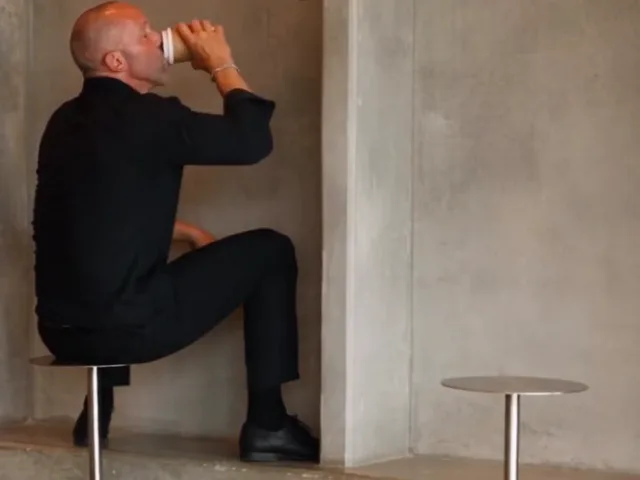
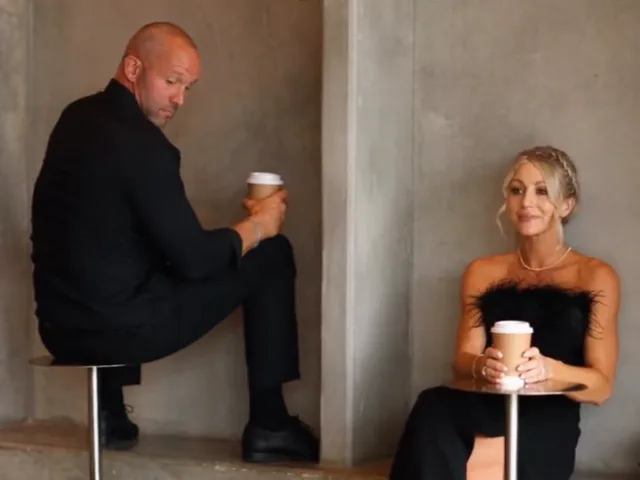
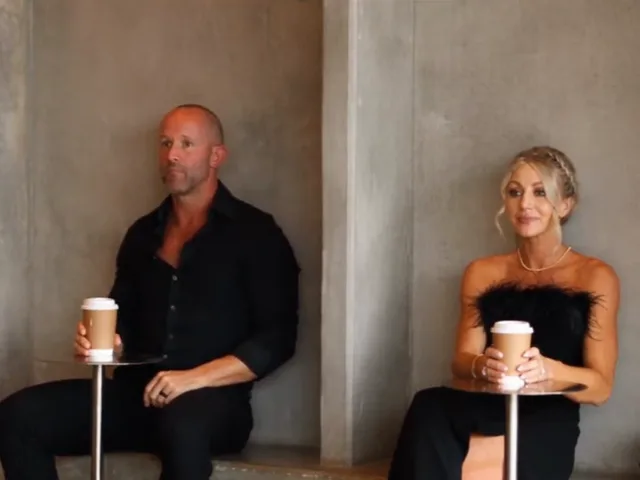
Look at the furniture before you look at either face. Two round steel discs stick out from a low concrete ledge. Seen head-on, the discs look just big enough to sit on. These stills come from the 15-second cut of Lee Houston’s clip in the player above. Watch what occupies each disc as the scene unfolds.
A perfectly good seat
The first guest has a coffee in hand and a foot up on the ledge. He looks quite at home. You could watch this opening and make exactly the same mistake. The giveaway is on the other side of the pillar, where you can see a matching tabletop with nothing on it.
The second cup gives it away
By six seconds the second guest has walked in, taken a seat on the concrete ledge and found a place for her cup. Look across at the first guest. Where she has room to put down a drink, he has put his entire body. She never has to tell him what he’s done. Her cup does it for her.
Act like you knew all along
The first guest has found a way down. A moment ago his knees were up by his coffee. Now the two guests sit at the same height, each with a table within reach. If you scrub back from here to the opening, the strange little seat immediately looks like a table.
Choose a photo for your café guest
To play the guest sitting on the table, add your portrait on the left. This guest looks sideways when the other person sets down a cup. Pick an eye-level photo with both eyes visible. If you’re holding a cup in the photo, keep its rim below your chin.
To play the guest who walks in, add your portrait on the right. A waist-up photo works well here because the entrance shows more of the outfit. Leave the collar and shoulders in the crop if you want the guest to wear that jacket or shirt.
For two guests, use one photo per slot. If you have a photo together, make two crops from the original. Keep the whole hairline in each crop and check that the other person’s face is out of frame. If the eyes blur when you zoom in, choose a closer portrait.
Upload each portrait as a JPG, PNG or WebP, up to 10 MiB. If your phone took the picture in HEIC, export it as a JPG first.
The Fancy Cafe prompt
With one photo, @Image1 plays whichever guest you selected. The other guest keeps their face and clothes from @Video1. With two photos, @Image1 is always the seated guest and @Image2 is the one who walks in. The prompt below updates when you change the cast.
Recreate @Video1 as one continuous 15-second live-action take. Match its fixed framing, soft daylight, grey concrete pillars, low wall ledge, small round tables on curved steel posts and polished floor. Keep the white caption “POV: Your first time in a fancy cafe” at the top as in the reference.

Cast @Image1 as the guest perched on the left table. Keep the arriving guest’s face and clothes from @Video1.

For each replacement, keep the face shape, eyes and eye color, brows, nose, mouth, skin tone, age, hair, facial hair, glasses, freckles and visible clothing from the assigned photo. Extend cropped clothing naturally. Keep that identity through every turn and especially the climb down. For a pet photo, keep its species, face, coat markings, limbs and natural proportions.

0–1.5s: The left guest perches on the tabletop, feet on the ledge, sipping from a paper cup.
1.5–4s: The other guest enters from the right with coffee, sits on the ledge and sets the cup on the little table.
4–10s: Both sip. Still perched on the table, the first guest glances over and slowly realizes the mistake.
10–12s: The first guest climbs down.
12–13s: They settle on the ledge and put their cup on the tabletop.
13–15s: They face forward, mildly embarrassed, pretending nothing happened.

Follow the reference gestures and eyelines without cutting away. Exactly two characters, one head each, natural limbs and hands, five fingers per human hand. The guests react with a glance and never mouth dialogue. No face swaps between roles, extra people, additional text, logos or watermark.
Give the seated guest one last sip
Choose your cast, then open Edit in generator. Find the 4–10s beat and replace it with this line.
“Both guests sip their coffee. The seated guest glances at the cup on the other table, pauses, then takes one last slow sip as if sitting up here was the plan all along.”
Leave the climb down at 10 seconds. That pause gives the joke room to land while both tables and the cup are still in view.
How the Fancy Cafe joke spread
The clip above comes from Lee Houston’s TikTok. In the days that followed, other guests found themselves on the wrong side of the coffee table.
The clip behind this template
Lee Houston posted the version used here on TikTok. The low concrete ledge, curved steel table legs and black evening dress all come from his clip.
Watch @leehoustonxA remake with a CapCut link
A day later, @kkubi99 posted the skit with the familiar “first time in a fancy cafe” caption. Viewers could open CapCut straight from the TikTok post.
Watch @kkubi99The café joke gets its own entry
Know Your Meme collected TikTok and Instagram versions in one entry. You can compare how different guests play that moment of recognition.
Read the Know Your Meme entry
Frequently asked questions
Can I play just the guest who walks in?
Yes. Put your photo in the right-hand slot and leave the left one empty. The prompt keeps the seated guest from the reference. You can also do the reverse, or fill both slots to cast two people.
We only have a photo together. Can we use it?
Crop a separate portrait of each person and save each as a JPG, PNG or WebP up to 10 MiB. Put the person who will sit on the table on the left and the person who walks in on the right.
Is the clip in the player what I’ll receive?
The player shows the 15-second reference cut. Kling 3.0 Omni uses it alongside your portraits to generate a new take. Expressions, fingers around a cup and the exact timing of a glance can vary.
Should I choose 720p or 1080p, and how many credits does each cost?
Kling Standard (720p) costs 800 credits and works well for trying out your cast. Choose Kling Pro (1080p) for 1,700 credits if you want a clearer look at the guests’ expressions across the tables. Both are 15-second vertical videos with the original sound. The price is the same for one portrait or two.
Does the video include the TikTok sound?
Yes. Play the reference here to hear it. Mianvo pairs your new picture with that same 15-second audio track for both the 720p and 1080p downloads.
Can I try my photos before signing in?
Yes. You can choose a portrait, replace it or restore a guest to the original cast. When you’re ready, Generate video opens sign-in. You can then review the credit quote and start the generation.
Can I use a real person’s photo or share the result publicly?
Mianvo provides the video tool. You are responsible for the material you upload and how you use the result. You need permission to use someone else’s likeness or voice. Real-person face swaps and impersonation are prohibited, even with consent. Before sharing, make sure you have the rights to publish the visuals and music. Do not present an AI-generated clip as genuine footage. To report infringement, send the page link or task ID to support@mail.mianvo.com. We review reports and take action under applicable law.