Love Handstand AI Video Generator
Three letters wait on a white wall. You rise from the floor, bend your legs between the O and the E, and supply the missing V.
Why choose Mianvo?
Pause the original on the V before choosing a photo. The frame shows exactly which part of your outfit will have to read as a letter.
- Credits back if generation fails
- See the credit cost before you generate. If the job is confirmed failed and no video was delivered, we return the credits reserved for it.
- Your photos stay private
- The selected model provider processes your photos. They stay private, and Mianvo does not use them to train its own AI models. You decide whether to publish your video.
- Automatic photo cleanup
- Original photos stored by Mianvo enter automatic cleanup 24 hours after upload. If a queued or running job still needs a photo, cleanup waits until that job ends.
How three letters become LOVE
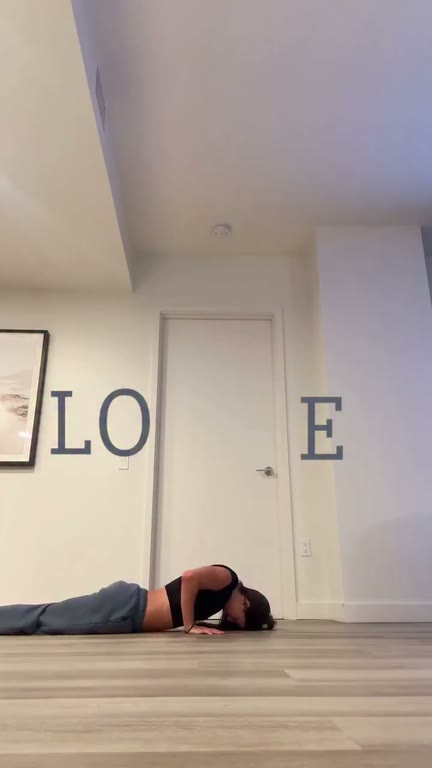
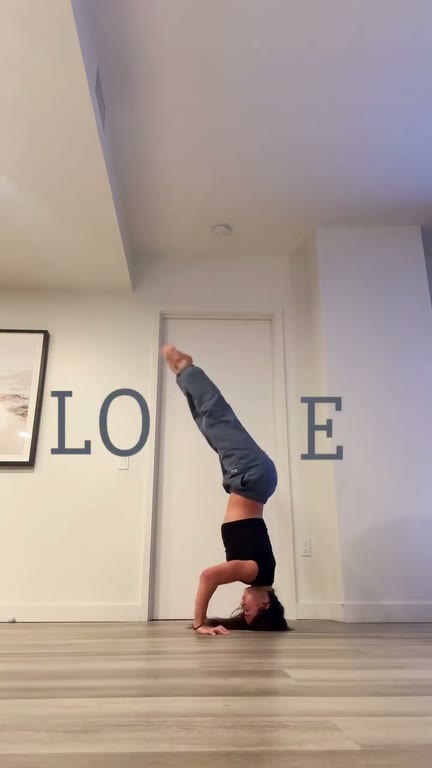
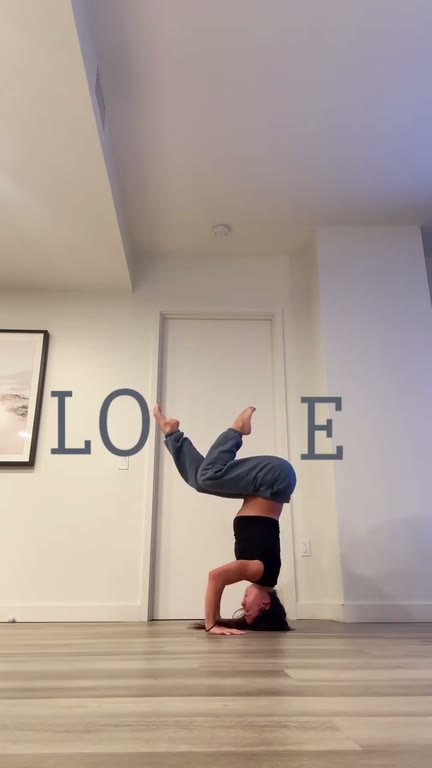
The camera stays low for the entire room shot. The closed door provides a background for the moving letter, and the horizontal boards in the foreground make even a small shift of balance easy to see. Follow the feet through the four frames below. They start on the left of the door and travel up into the lettering before the performer stands again.
Three printed letters and a gap
The performer starts close to the pale floor. Much of the wall above her is empty, leaving room for the move. The O sits to the left of the door, the E to its right. The blank space between them gives the audience a small puzzle before either foot leaves the ground.
The feet travel above the door handle
The torso is inverted and the legs are extending upward. The feet come close together at the top of the rise. Look at the relationship between the legs and the fixed letters here. A straight line still leaves the word unfinished, which makes the next movement count.
Bent legs fill the space
The knees stay bent and close together while the feet splay apart above them. The performer holds her position near the floor. The feet now mark the tips of the missing V. Both ends of the word and the person making its middle fit in the same shot. This is the moment to choose for a freeze frame if you want someone scrolling past to read the joke.
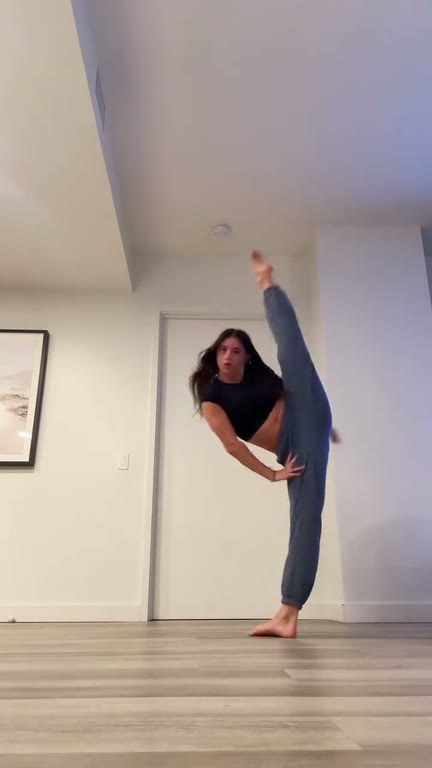
The dancer comes back into view
Toward the end, the wall lettering disappears and the performer comes upright. One leg kicks high, with the closed door still directly behind her. This short finish gives the face and outfit another moment in view after several seconds of looking mainly at an upside-down silhouette.
Choose a photo that keeps both legs in view
An ordinary standing photo works well here. Look for a clear view from the top of the head down to both feet. The reference supplies the inversion, the balance and the kick. Your photo supplies the person who has to stay recognizable through all three. A friend taking a level photo from a few steps away can get the face and outfit in one shot. A mirror selfie can hide the most useful part of the face behind the phone.
Look at the trousers before you upload. In the middle of the clip they do the work of a printed letter. Two distinct legs in a strong colour stand out against the pale door. A long coat draped over the knees or a floor-length skirt changes that outline. If you want the resulting V to look like the one on the wall, choose an outfit in which you can see where each knee bends. The original performer wears a dark top and blue trousers, but your source photo can give the pose a different colour.
Keep the photo right side up. Rotating it upside down can make it harder to judge whether the features are sharp. The point at which a face is easiest to compare comes near the end, when the performer springs back to her feet and faces the low camera. Zoom in on your chosen photo once. If you can pick out the eyes and the hairline, zoom out and check that your crop still includes the shoes or bare feet. Both checks refer to the same upload.
If there are several people in your favourite outfit picture, crop a copy around the performer first. Check the space beside each leg for a stray hand, another shoe or a bag strap that cuts across a knee. The room in your photograph can be entirely different. The closed door, the frame on the left wall and the light floor belong to the attached video. There is no need to find a matching room or attempt the pose yourself.
The Love Handstand prompt and its missing letter
Read the prompt alongside the four frames. The performer is the changing part. The letters sit in the same positions as the legs travel across the door. Writing the word LOVE as a single caption would fill the gap too soon and give away the reveal. The preset names the letters separately and leaves their spacing to the reference. It also keeps the low viewpoint, so the feet move across the lettering at the same height on screen.
The movement has two distinct shapes before the kick. First the legs rise together in one tall line. Then the performer bends the knees and opens the lower legs inside the gap. A broad standing split, or a jump that opens the legs on the way up, would tell a different visual joke. Keep both stages in the prompt if you change the clothing, the lighting or another small detail. The attached video already provides the path from one shape to the other.
Edit @Video1. Cast the person from @Image1 as the single performer, matching their face, hair and outfit across the whole shot. Keep the floor-level camera, closed white door, pale floor and fixed L O and E letters. Follow the original rise, straight vertical legs, bent-knee V in the gap, return to standing and final kick. Keep the timing and original sound. Leave the V to the performer’s legs.
Try one change to the lettering
For a personal variation, add “Use dark burgundy for the fixed L, O and E, keeping their size and spacing.” The colour can change while the position of each letter still gives the feet a target. When the video is ready, pause where the two legs separate. Cover the performer on screen for a moment. You should still see only the three printed letters. Uncover the performer and check whether the whole word now reads in one glance.
If you prefer to keep the source lettering, use the edit for a wardrobe detail instead, for example “Keep the white stripes down the outside of both trouser legs from the photo.” That is particularly useful when the two legs overlap on the way up. Choose one change for a first run so you know what to look for during that short hold.
Two takes on the missing V
The reference on this page is the white-door version. Another performer used a round rug and larger lettering for the same reveal.
The white-door take
@zara.silver starts on a light floor and brings blue trouser legs into the space between the letters. This is the clip in the reference player.
@zara.silver on TikTokA round rug under the pose
@strsoniaa takes the pose onto a round rug. Dark clothing and bold black lettering bring the legs and the printed letters closer in colour.
@strsoniaa on TikTok
Frequently asked questions
Do I need a picture of myself doing a handstand?
A standing photo gives the model a usable view of your face, your clothes and the outline of both legs. The reference clip carries the upside-down movement. People often call the trend a handstand, but the performer in this take brings her head and arms down to the floor before lifting her legs. You can use this template without filming that move.
Where does the V appear in the clip?
Watch the space in front of the door between the O and the E. At first it is empty. The feet rise almost straight up through it. The bent legs then open inside the gap, around the middle of the take. The frame marked 8.5 seconds is a good place to pause and read the complete word.
Will my room or the room in the video appear?
The preset keeps the room from the video. The pale wall gives the dark letters contrast, and the edge of the floor gives the viewer a steady horizontal line as the body turns upside down. To keep that composition, choose a photo for the person and their outfit. A distracting wall in the photo is worth cropping only if it overlaps the person.
Which parts of the original are included?
The reference player contains the full take from @zara.silver, including the preparation on the floor and the high kick after the word breaks apart. The reference measures 14.235 seconds. The generation uses a 14-second setting and retains the reference audio. The frames below the player are taken from that same clip, so you can check the shape of the letters before spending credits.
Can I use a real person’s photo or share the result publicly?
Mianvo provides the video tool. You are responsible for the material you upload and how you use the result. You need permission to use someone else’s likeness or voice. Real-person face swaps and impersonation are prohibited, even with consent. Before sharing, make sure you have the rights to publish the visuals and music. Do not present an AI-generated clip as genuine footage. To report infringement, send the page link or task ID to support@mail.mianvo.com. We review reports and take action under applicable law.