Never Let Her Pay AI Video Generator
In Never Let Her Pay AI, you’re the guest who insists on covering dinner. Your date puts her card away, you open your wallet to reveal a kitchen sponge, and the waiter shows you where the dirty dishes are.
- 1 portrait
- 11 seconds
- 9:16 vertical
- Source audio
Why choose Mianvo?
Replay the wallet close-up from the storyboard, then edit just that shot if you want the green edge of the sponge to show sooner. The prompt already describes the other shots, from the card at the table to the plates in the kitchen.
- Credits back if generation fails
- See the credit cost before you generate. If the job is confirmed failed and no video was delivered, we return the credits reserved for it.
- Your photos stay private
- The selected model provider processes your photos. They stay private, and Mianvo does not use them to train its own AI models. You decide whether to publish your video.
- Automatic photo cleanup
- Original photos stored by Mianvo enter automatic cleanup 24 hours after upload. If a queued or running job still needs a photo, cleanup waits until that job ends.
Never Let Her Pay AI in three frames
A guest in a dinner jacket has an unusual way of settling a restaurant bill. These stills come from the @s.nemz reference clip in the player above. Watch the opening once with your eye on the hands crossing the table. Then look at what is inside the pouch and where the waiter takes its owner. The last room explains why the guest brought that particular object to dinner.
Dinner is on me
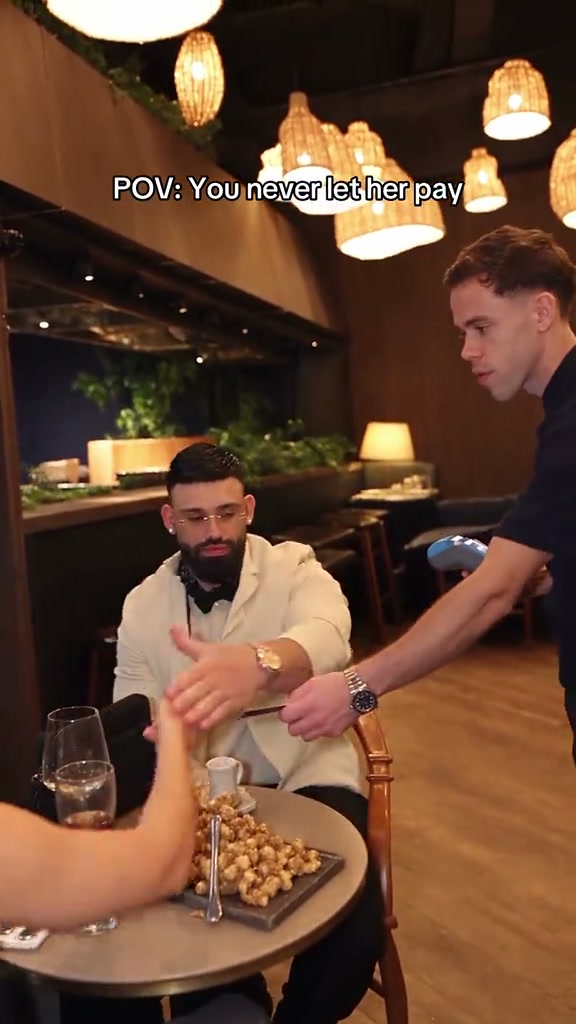
A card comes across the table from the foreground. The waiter has his payment terminal ready when the seated guest reaches forward to stop the card. The camera gives the table, the terminal and the guest’s white jacket room in the same frame. From this angle the gesture looks generous. We haven’t seen the contents of his wallet yet.
A look inside the wallet
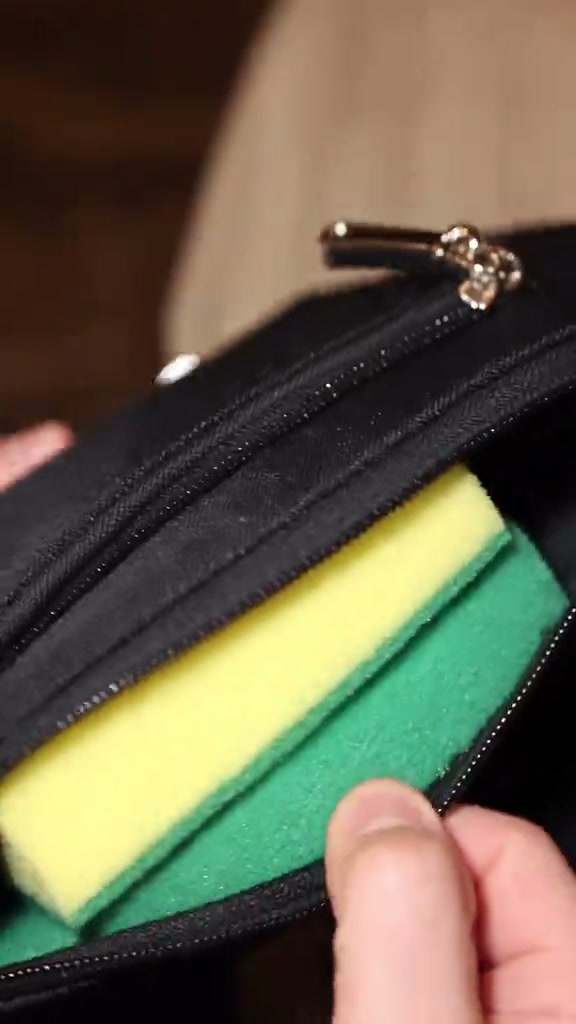
The film cuts close enough to see the zip teeth of a small black pouch. A yellow sponge fills the opening, with its green scrubbing layer along one edge. It barely leaves the pouch. The next cut goes straight to the guest’s face as he looks up at the waiter. He seems perfectly happy with what he has brought.
The waiter accepts
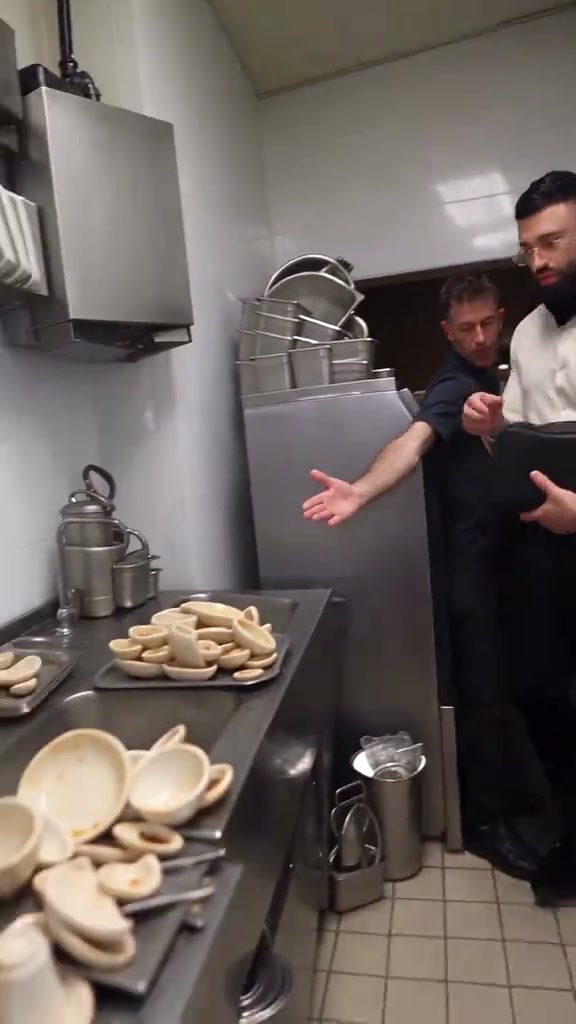
A moment earlier we were following the guest and the waiter through a warm dining room. Now the guest stands beside a steel counter under kitchen lights. The waiter holds out a hand toward a heap of used white plates. That little gesture is the punch line. The reference ends while the guest is still looking at the job ahead of him.
Choose a portrait of the guest who offers to pay
The clearest look at your character comes just after the wallet insert. The guest has been looking down at his lap. Now he raises his head, looks off to one side and waits for the waiter to accept his offer. Pick a picture where you can see the shape of both eyes, the line of the jaw and a little of the hairline. A photo taken from across a table is often a good choice. You get a natural seated expression and enough of the shoulders to see how the head sits.
You can wear a T-shirt in the photo. The prompt borrows the ivory dinner jacket and dark bow tie from the restaurant clip. If glasses are part of your look, choose a picture where the lenses are clear enough to see your eyes. The middle close-up is lit by the restaurant lamps, and the last view is under brighter kitchen lighting. A strong color filter or a phone flash reflected in both lenses gives the model a less useful starting point for that change.
There is no need to hold a credit card, a menu or a sponge in your portrait. The hands that offer the card enter from the foreground, and the tight shot of the wallet mostly shows fingertips. Pick the picture for the face the audience sees before and after that cut. A clean snapshot from the same evening is usually a better choice than a shot of you posing with the right prop in front of your chin.
A picture with your date can work as the starting material for a crop. Open the original photo and isolate the person who should get up from the table and follow the waiter. Keep the full chin, both sides of the head and some shoulder. Check the edge nearest the other diner for part of a second face. On a phone it is easy to overlook a cheek or a pair of glasses that will be quite prominent when the model sees the smaller crop.
The default Never Let Her Pay prompt
@Image1 casts just the diner in the ivory jacket. @Video1 is the attached restaurant clip. It supplies the date reaching across the table with a card, the waiter with his terminal and the cut from the warm dining room to the steel kitchen. Neither of those other roles needs a portrait.
The six shots give the guest a chance to tell the joke without speaking. First the card gets waved away, then the pouch opens far enough to show the sponge. After the guest looks up, the waiter sees what is on offer and leads the way. The shot of his hand indicating the dirty plates is the last thing the audience needs to see.
Edit @Video1. Use @Image1 as the identity of the diner in the ivory dinner jacket. Keep the face, skin tone, hair, glasses and facial hair of that person consistent when they look down, turn toward the waiter and appear under the kitchen lights. Dress the diner in the reference outfit. Keep the waiter in the dark uniform and the date offering the card as they appear in the reference.

Follow these six shots in @Video1, cutting at the same moments.
0–3.3s. The date reaches forward with a bank card. The seated diner gently waves the card away while the waiter stands ready with a terminal.
3.3–4.8s. In close-up on the diner's lap, fingers part the black zip pouch just far enough to see a yellow sponge and its green scouring edge inside.
4.8–6.0s. The diner looks up, composed, with the pouch still in hand.
6.0–7.7s. Back at the table, the diner presents the open pouch to the waiter.
7.7–9.0s. Follow the pair from behind as the waiter guides the diner away.
9.0–11.0s. Finish in the steel kitchen. The waiter gestures toward a counter piled with used plates and the diner looks down.

Match the timing of each action to @Video1. Preserve the warm dining room, the cooler kitchen and the sound of the reference. Keep the offers of the card and the sponge in separate shots. The same sponge remains in the pouch. End on the gesture toward the plates. Do not add dialogue, captions, new people or an extra dishwashing scene.
Give the guest one confident nod
Open Edit prompt and find the 4.8–6.0s shot where the diner looks up. Replace that action with “After the sponge is visible, the guest looks up at the waiter and gives one small, confident nod, the open pouch still in hand.” Keep the wallet insert immediately before it so the audience understands what the nod means.
For a more awkward version, try “The guest glances down at the open pouch once before meeting the waiter’s eyes.” A tiny hesitation plays differently from a proud nod even though the rest of the story is the same. Pick one of those reactions. A request to look embarrassed, laugh, shrug and then wink gives a very short close-up more work than it has time for. Leave the wallet open across the cut so the waiter still has something to respond to.
When you replay it, look for the nod between the first glimpse of the sponge and the moment the diner presents the pouch. The next cut needs the yellow foam and green scouring edge to be visible inside the pouch. Keep the last kitchen shot on the waiter’s hand and the stack of plates. The pause gives the viewer time to work out how dinner will be paid for.
From the dinner skit to a CapCut template
This template follows @s.nemz’s restaurant clip. Four days later, a French CapCut post invited viewers to play the guest themselves.
The clip behind this template
In @s.nemz’s TikTok, the guest waves away his date’s card and opens a black pouch with a dish sponge inside. The waiter leads him to the kitchen and points to a stack of dirty plates.
Watch @s.nemz’s clipA photo puts you at the table
@team_capcut_fr shared a French-language CapCut template. The post asks you to add your photo and play the diner who insists on picking up the bill.
See @team_capcut_fr’s template post
Frequently asked questions
Which character will I play?
Your portrait supplies the guest in the ivory jacket, the person beside the date at the table and beside the waiter in the kitchen. Look for your features again after the close-up of the sponge. The waiter still handles the card reader and leads the way, and the date still reaches in with the card.
Do I need a photo of the restaurant or the waiter?
One portrait is enough. The template sends the restaurant clip along with it. The hanging lamps, food on the small table, payment terminal and kitchen counter all have a place in that reference. An extra picture of your favorite restaurant would describe a different room and wouldn’t tell this version where to put the payment scene.
Why does the guest leave the sponge in the pouch?
Watch for the green strip along the yellow foam as the zip opens. You can identify the object while it is still tucked inside, just where you might expect a bank card. When the camera returns to the table, the guest can simply show the open pouch. Throwing the sponge across the table would give the waiter a completely different action to answer.
Will the music or voices come from my portrait?
The video edit uses the sound from the restaurant reference. A still portrait supplies facial detail and carries no audio. Play the reference with sound on to hear the short passage that accompanies the table, wallet and kitchen cuts. You can mute the file in your own editor if you want to record a different line for your post.
Does the guest actually wash the dishes?
The reference ends when the waiter shows the guest the used plates. You see the new room and what would have to be washed, then the clip ends. That leaves the audience to picture the work. To reproduce the reference ending, keep the direction to look down at the counter as the last action in your prompt.
How many credits does this restaurant clip cost?
For this 11-second clip, Kling Standard (720p) costs 590 credits and Kling Pro (1080p) costs 1,250. Both include the restaurant soundtrack. Choose a resolution to see its price on the generate button.
What should I check before sharing the video?
Play the wallet insert at normal speed first. Can you tell what is in the pouch before the guest looks up? Then watch the change of room. The person beside the steel counter should be recognizable as the guest who offered to pay, with the waiter in the same dark uniform beside them. A good still of the guest at dinner tells you little about either of those cuts.
Can I use a real person’s photo or share the result publicly?
Mianvo provides the video tool. You are responsible for the material you upload and how you use the result. You need permission to use someone else’s likeness or voice. Real-person face swaps and impersonation are prohibited, even with consent. Before sharing, make sure you have the rights to publish the visuals and music. Do not present an AI-generated clip as genuine footage. To report infringement, send the page link or task ID to support@mail.mianvo.com. We review reports and take action under applicable law.