Waiting on My Fries AI Video Generator
The customer is still waiting for fries. One cat puts its paws to its head while the other steps up to the counter and starts dancing.
Why choose Mianvo?
The two role photos show who dances and who forgot the order. Watch the counter from the customer’s side before assigning your pets to their parts.
- Credits back if generation fails
- See the credit cost before you generate. If the job is confirmed failed and no video was delivered, we return the credits reserved for it.
- Your photos stay private
- The selected model provider processes your photos. They stay private, and Mianvo does not use them to train its own AI models. You decide whether to publish your video.
- Automatic photo cleanup
- Original photos stored by Mianvo enter automatic cleanup 24 hours after upload. If a queued or running job still needs a photo, cleanup waits until that job ends.
The forgotten order, in four looks across the counter
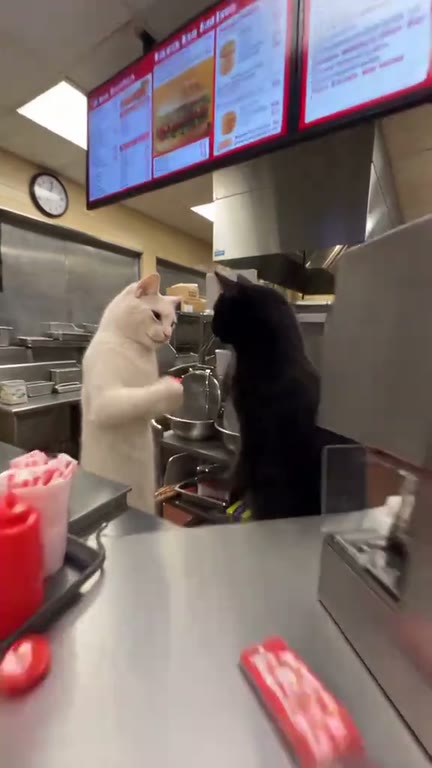
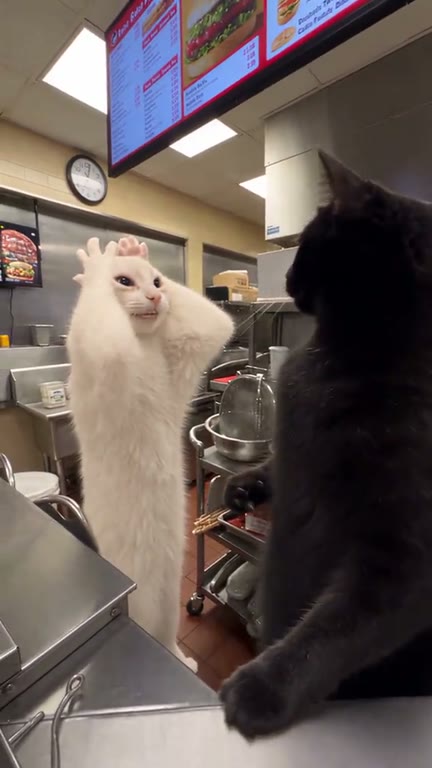
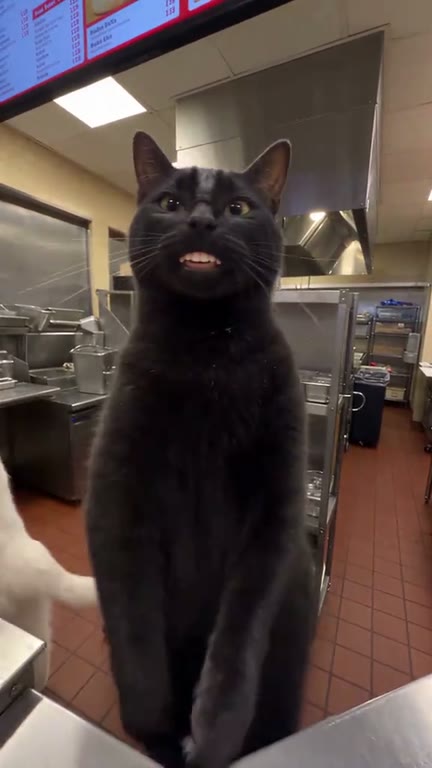
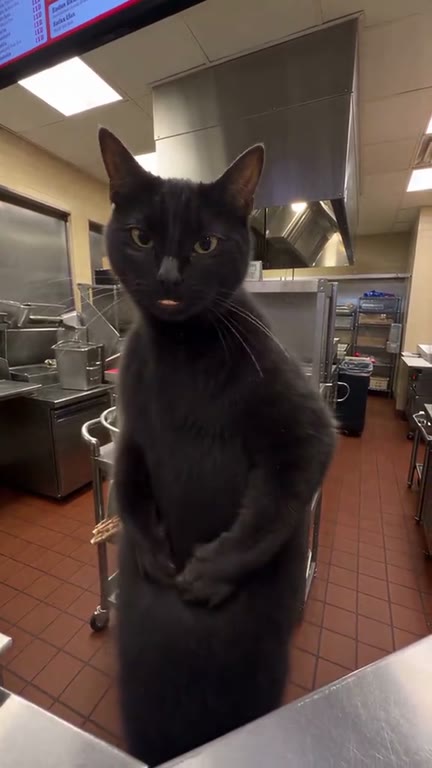
The camera takes the customer’s place. At first you can see both cats and much of the shop, including the menu screens above them and the items on the counter. Once the excuse runs out, the black cat gets most of the frame. These stills follow that handoff through the opening 15 seconds of the source post.
Two coworkers behind the steel counter
The wide view establishes a busy takeaway kitchen before either cat has a chance to explain the missing order. One is light and one is dark, so the two jobs are easy to keep straight during the exchange. Watch the black cat on the customer’s side of the pair. It is the one the first photo will replace.
The coworker suddenly remembers
The white cat’s paws come up to the sides of its head. Across from it, the black cat turns to see the reaction. Both faces are part of this first beat even though only one of them will keep the customer occupied. The little exchange explains why a coworker can appear for just a few seconds and still have a part worth casting.
The customer has the dancer’s attention
The other worker moves aside. The black cat stands close to the counter, filling much more of the picture now. You can still see enough of the kitchen behind its ears to know this is the same restaurant. There is a brief moment of direct eye contact before the paws begin doing most of the talking.
A serious face and a slow dance
The paws sweep across the body as the dancer keeps the customer in view. The change from an ordinary service-counter exchange to a personal performance is what carries the joke. The steel counter remains at the bottom of the frame. The audience is still standing in the same spot and still has no fries.
Pick the pet that can hold a straight face
Start with the photo for the dancer. This pet spends much of the second half alone at the counter, looking directly at the customer. A level picture with both eyes visible gives you something to recognize once the shot moves in close. For a cat, keep the ears, the shape of the muzzle and the markings around the nose. For a dog, use an angle that shows the length of the muzzle. A photo taken directly above a food bowl can hide all three.
The source performer happens to be black. A different coat colour is welcome. If your pet has a dark face, take a look at the shadow around the eyes when you open the image at a larger size. You should be able to see both eyes separately from the fur. For a light pet, look at the rim of each ear against the background. A little contrast there is useful when the head moves across the bright menu boards in the first few seconds.
The optional coworker has a different assignment. This pet stands farther back, and the clearest joke is the moment the paws go up to its head. A close head and shoulders picture works well for this part. Pick a photograph that shows the ears in their usual position. The startled expression and the lifted paws already belong to the reference. There is no need to dress the pet as a cook or try to make it copy the pose for a photograph.
With two pets, choose a separate image for each slot. A favorite picture of both of them on the sofa can work if you can make two clean crops, each with a single head and a little chest. Look for the second animal’s ear creeping into the crop beside the first animal’s face. If they are cuddled too closely to separate, choose another picture for that role. Their real-life positions in the sofa photo have no bearing on where they stand at the counter.
The Waiting on My Fries prompt keeps the jobs separate
Follow the black cat for the first few seconds. It turns toward the camera, looks back at the white coworker, and then takes over at the counter. All of those views belong to the dancer. The prompt keeps the same pet assigned to that role even when its face turns away. A second image gives the white coworker a separate identity. If you leave that slot empty, the preset asks the model to keep the coworker already present in the clip.
The waiting customer is heard from the near side of the counter and stays out of view. That is what makes the camera feel like a customer’s phone. The close look from the dancer reaches straight out to whoever is watching. Keep the camera on that side of the worktop when you edit. Adding a reverse shot of a customer, or moving into the kitchen to watch the fries cook, would use up the pause in which the dance takes place.
Edit @Video1. Use @Image1 for the black cat who stays at the front and dances. When a second image is attached, use @Image2 for the white coworker who puts both paws to its head. Otherwise retain that coworker from the clip. Preserve each selected pet’s face, coat and markings throughout. Follow the customer-side viewpoint, the turn to the counter, the coworker’s reaction and the dancer’s restrained paw movements. Keep the menu boards, steel work surface, framing and reference audio in their original order and timing.
Give the dancer one recognizable detail
If your cat has a white bib, try adding “Keep the little white patch under the dancer’s chin visible as the paws cross the chest.” The instant to check is the close view of the dancer after the other cat has moved aside. A distinct chin marking helps identify the same pet you saw farther away in the opening. For a tabby, specify the dark stripe between the eyes or a band on the foreleg that rises into view.
Keep a visual change local to one character. A request to put a collar on both cats can make them look more alike just when you want the audience to tell them apart. If the coworker normally wears a blue collar, name the coworker in the instruction. Play the opening exchange and pause before the dance. That is the easiest moment to check the detail on the supporting pet, whose screen time is much shorter.
From taco-shop skit to a two-cat kitchen
The reference used here follows the cat adaptation. The earlier restaurant sketch and the later cat performance have distinct source posts.
The restaurant comedy sketch
@f.r3n shared the live-action restaurant reel on Instagram. The customer waiting on an order and the worker buying time with a performance provide the setup for the cat version.
@f.r3n on InstagramThe workers become cats
@merkurianin posted the version with a black cat at the counter and a white coworker in the kitchen. The first 15 seconds of this recording are the reference for this template.
@merkurianin on TikTok
Frequently asked questions
Which cat gets my first photo?
The first slot is the worker who stands closest to the customer and dances. In the reference this is the black cat. Assign the pet you most want to see face to face to this role. The second slot belongs to the white cat who reacts to the missing fries. The two role thumbnails are cropped from the scene so you can compare them before choosing.
Can I make the clip with just one pet?
Yes. Give the counter dancer a photo and leave the coworker empty. The white cat from the reference remains in the scene. This works especially well if you want the opening to feel familiar before your own pet takes over the dance. A second photo lets two friends cast their pets in separate parts of the same joke.
Why is the template shorter than the TikTok post?
The linked two-cat video runs for about 23 seconds. This template uses its first 15 seconds at the original speed. You see the customer arrive at the counter, the reaction to the order and the first stretch of dancing. In the longer post the camera returns to the other worker later on. The source link below the player takes you to that longer version.
Does this version keep the customer’s voice?
Yes. The reference excerpt includes the restaurant skit audio, including its spoken exchange. You can play it in the reference tab before choosing any photos. If you plan to share it where dialogue matters, listen first and turn the player volume up. The close look into the lens makes much more sense after you hear why the customer is waiting.
Can I use a real person’s photo or share the result publicly?
Mianvo provides the video tool. You are responsible for the material you upload and how you use the result. You need permission to use someone else’s likeness or voice. Real-person face swaps and impersonation are prohibited, even with consent. Before sharing, make sure you have the rights to publish the visuals and music. Do not present an AI-generated clip as genuine footage. To report infringement, send the page link or task ID to support@mail.mianvo.com. We review reports and take action under applicable law.