Singing Birthday Cat AI Video Generator
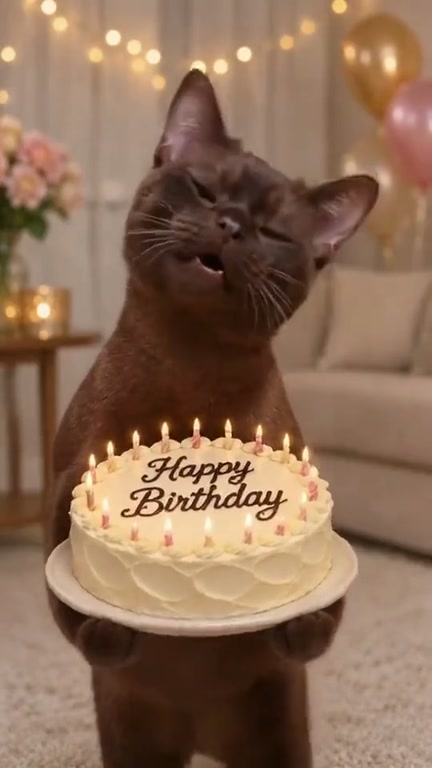
The cake nearly fills both paws. Above it, a brown cat tips its head back to sing, then looks straight at the person receiving the birthday greeting. One pet photo puts your singer behind the candles.
Why choose Mianvo?
Play the reference before you pick a photo. You can see how high the icing reaches and how much of the face stays visible when the singer lifts its chin. Those two moments make it easier to choose between your pet portraits.
- Credits back if generation fails
- See the credit cost before you generate. If the job is confirmed failed and no video was delivered, we return the credits reserved for it.
- Your photos stay private
- The selected model provider processes your photos. They stay private, and Mianvo does not use them to train its own AI models. You decide whether to publish your video.
- Automatic photo cleanup
- Original photos stored by Mianvo enter automatic cleanup 24 hours after upload. If a queued or running job still needs a photo, cleanup waits until that job ends.
Four expressions above the cake
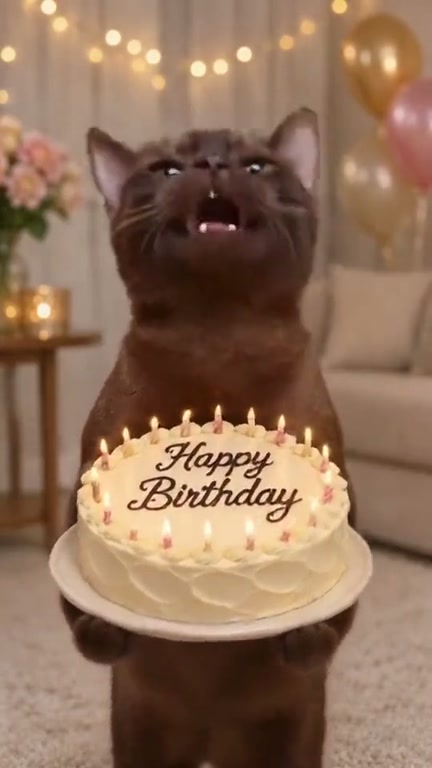
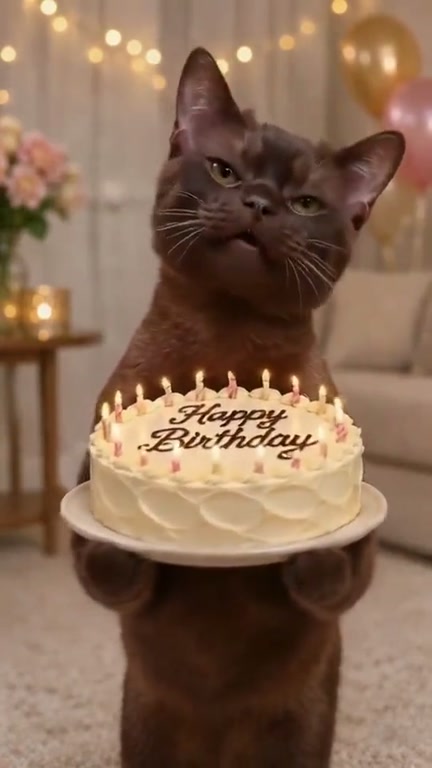
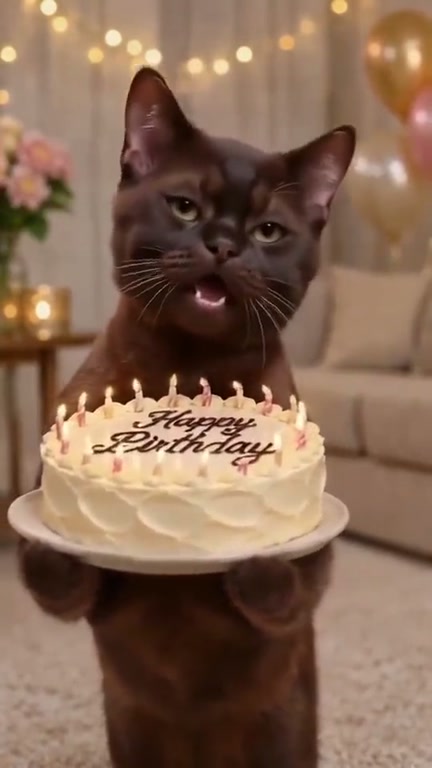
Each still comes from the reference excerpt in the player. The clock starts at the beginning of that excerpt. Watch the top of the cake as a fixed point while the head moves above it.
The singer leans into the greeting
The face tilts to one side while the plate stays level. The two ears sit against a line of warm party lights. This opening gives you enough room to see the whole face before the performance stretches the expression.
The chin lifts for the note
The cat opens its mouth wide and tips its chin toward the lights. The cake is still upright, so the strongest movement is all above the candle flames. A chin marking becomes much easier to see at this instant.
The cake holds its place
The dark lettering and piped cream stay in the lower part of the picture. The singer has room to move its mouth and angle its ears while the plate stays in front of the same warm sofa and flowers.
A last look over the icing
The head comes back toward the camera near the end of the excerpt. After the bigger open-mouth expressions, this steadier look gives the greeting a natural end. Let it run before you switch to a birthday message of your own.
Choose a face that will still read above the candles
Look at the small portrait your friends already use to recognize your pet. Can you see the outline of the ears, the bridge of the nose and where the chin meets the chest? Those are the parts that will sit above the cake. A cat stretched out asleep may be a favorite family picture, but a sitting portrait taken from about eye level gives this particular singer a much more legible starting pose. A dog can be the singer too. Give a long muzzle enough space inside the crop.
For a black or dark brown cat, try the photo taken next to a window before the one taken in front of a bright window. In a backlit phone photo the ears may show up beautifully while the face becomes one dark patch. The candles in the reference are below the chin; they cannot recover the eye color or the little white line on the nose that is missing from the input. With a pale pet, check the opposite: you should still be able to see where the whisker pads end against the background.
Leave a little of the upper chest in the frame. If your cat has a white bib, this is the part that may peek out above the icing when the head rises. The paws, the cake and the party room are already in the moving reference. There is no reason to set up a cake for your photo or put a real animal near a candle. If another pet is in the picture, crop it out while keeping both ear tips of the birthday singer.
Where to put the birthday name on a Singing Birthday Cat video
What the singing birthday cat prompt preserves
The reference supplies a particular performance. A little cat is trying to deliver a big vocal while balancing an enormous cake. The mouth stretches, the chin lifts, and the eyelids narrow. The plate stays near the same spot throughout, which makes each small change in expression visible. The preset assigns the identity to the uploaded picture and leaves that performance in the reference. One picture of a relaxed pet is enough even though the finished scene involves singing.
Notice the writing on top of the cake. The camera looks across the icing, with a row of candle flames between the viewer and the singer. If your priority is a recognizable face, leave those objects where they are. Moving the cake toward the lens or asking for a close-up of the candles would cover part of the muzzle just when the singing becomes most expressive.
Edit @Video1. Replace the single brown cat behind the birthday cake with the pet in @Image1 from the opening frame through the final glance. Match its coat markings, ears, muzzle and eye shape. Keep the cake upright in the front paws with the candles and icing visible. Follow the reference head tilt, mouth movements, timing and birthday vocal. Preserve the vertical fixed camera, warm party lights, balloons and sofa.
Keep one familiar patch of fur on the high note
Suppose everyone knows your cat by the cream patch under its chin. You could add “Keep the small cream patch under the singer’s chin visible when the head tilts back.” This gives the model something specific to preserve and gives you an easy moment to inspect afterward. A patch around one eye should be described on the side where you actually see it in your photo. Be careful with front-camera selfies, which can reverse markings.
Play the result once with the volume up before you stop on a frame. Then go back to the head tilt to inspect the feature you asked for. The eyelids may be almost closed there, so a chin or ear marking can be easier to judge than eye color. Use the quieter, forward-facing glance near the end to check the eyes. Those two views tell you more about the likeness than a single frame taken in the middle of an open vowel.
Which birthday cat is in the preview?
These are two identifiable versions. The first link is the specific performance used here. The second shows how the birthday greeting was shared as a template.
A birthday song with a brown cat
@momruoy7 shared the cat holding a white cake in a room with balloons. The post invites viewers to send the birthday surprise to a friend. The preview on this page follows that performance and credits the uploader.
@momruoy7 on TikTokA CapCut birthday greeting
@templates197 posted a birthday version with CapCut and MemeCut tags. The greeting can travel with a different pet in the starring role while the birthday cake still explains the occasion at a glance.
@templates197 on TikTok
Frequently asked questions
Does the clip include the entire original birthday song?
The template uses the final 15 seconds of a roughly 18.5-second reference. It starts about 3.5 seconds into the credited performance and keeps its ending. Play the preview with sound to hear precisely which words and notes your birthday message will include.
Can I make a dog sing instead of a cat?
Yes, use your dog in the singer slot. Pick an eye-level portrait with the muzzle and both ears visible. A floppy ear down the side of the face or a patch above one eye can give the recipient an immediate clue to which family pet is singing. The template keeps the cake-holding pose from the cat reference.
Do I have to photograph my pet holding something?
A comfortable sitting pose is fine. The reference supplies the paws around the plate and the upright body. Photographing a cake in front of the pet would only hide the chest and chin that help identify the singer in the close-up.
Will the video sing a person’s name?
The supplied performance has a fixed vocal. A name typed into the visual prompt does not record new lyrics or a new singer. For a greeting addressed to someone specific, add the recipient’s name as a caption when you send the finished clip, leaving the mouth and icing clear.
Where can I check the aspect ratio and sound?
The preview plays a vertical 9:16 excerpt. Turn up the volume on the player under Original clip. Both output quality choices follow this portrait framing and the same timed excerpt. After generation open My video and listen through the final glance before you share it.
Can I use a real person’s photo or share the result publicly?
Mianvo provides the video tool. You are responsible for the material you upload and how you use the result. You need permission to use someone else’s likeness or voice. Real-person face swaps and impersonation are prohibited, even with consent. Before sharing, make sure you have the rights to publish the visuals and music. Do not present an AI-generated clip as genuine footage. To report infringement, send the page link or task ID to support@mail.mianvo.com. We review reports and take action under applicable law.